
A one-page money snapshot may give you a 3–5 minute view of your cash, debt, bills, and net worth. Instead of checking 6–10 accounts one by one, I may keep everything in one place: account balances, monthly pay, fixed bills, variable spending, debt due dates, and big upcoming costs like taxes or insurance.
Here’s the short version:
- I may start with a full list of every account and debt
- I may choose one format: spreadsheet, budgeting app, or portfolio tracker
- I may keep the page to three parts:
Top: cash, investments, debt, net worth
- Middle: take-home pay, fixed costs, variable spending
- Bottom: due dates, big upcoming bills, and watch items
- I may review it on a simple schedule:
Weekly: about 10 minutes
- Monthly: about 20–30 minutes
- Quarterly: about 30–45 minutes
A few details may make the page more useful: an as-of date like 06/22/2026, debt APRs and minimum payments, and uneven expenses such as property tax, tuition, or repairs. Free weekly credit reports from AnnualCreditReport.com may also help fill in missing loan or card details.
If I want a plain system, this article comes down to one idea: put what I own, what I owe, what comes in, and what may go out on one page so gaps may show up faster.
The One-Page Financial Plan Every Spouse Needs (FQF)
Gather every account, balance, and obligation first
Before you pick a format, pull together the raw numbers your page will track. A one-page summary may only work if it includes every account and obligation, not just the ones you check all the time.
List all accounts and assets in one inventory
Write down every account and asset with its current balance. That may include checking, savings, emergency funds, taxable brokerage accounts, 401(k), 403(b), IRA, Roth IRA, HSA, 529 plans, and stock compensation like RSUs or options. If you own real estate, include your home equity.
Old 401(k)s, deferred compensation, and private investments belong here too, even if you update them by hand. If they’re left out, your net worth may look lower than it is, and that gap may make the full picture harder to see.
Add debts, recurring bills, and upcoming cash needs
Once your assets are listed, look at the other side of the balance sheet. Write down every debt - mortgage balance, student loans, credit card balances, auto loans, and HELOCs - plus the APR and minimum monthly payment for each one.
Pulling your free credit reports from AnnualCreditReport.com may help here: Equifax, Experian, and TransUnion each offer free weekly reports.
Also add recurring bills like rent, utilities, insurance, phone, subscriptions, childcare, and dues. That may give you a clearer view of your monthly fixed-cost baseline.
Then add upcoming cash needs - the uneven expenses that don’t hit every month but may throw off your budget when they do. Property taxes, insurance premiums, estimated taxes, tuition, and planned major repairs all need a line on the page. Those items may keep the page more honest about what cash may be needed next.
A useful habit is to set aside money incrementally for these bills - a set-aside fund for irregular bills - so the cash is ready when the payment hits.
Use this checklist so nothing gets skipped:
Once this inventory is done, you may be in a better spot to choose a format that feels easy to keep up to date.
Pick a one-page format you will actually keep up
Now that you’ve listed every account, debt, bill, and upcoming cost, the next step is choosing one tool that holds it all in a single view. Go with the format that makes weekly updates feel easiest, not the one packed with the most bells and whistles. The best setup may be the one that fits your categories without adding extra work.
Use a spreadsheet for full control and custom fields
If you want the most control, a spreadsheet may be the best fit. It may work well when your one-page summary needs custom calculations and a printable snapshot.
A simple four-tab setup may cover the main workflow:
- Transactions log for all inflows and outflows
- Accounts sheet for balances by institution
- Budget sheet for planned vs. actual spending
- Dashboard for the key numbers in one printable view
The tradeoff may be upkeep. Manual entry is often the reason people stop using a money system. Keeping the category count between 10 and 20 spending categories may make the process easier to stick with - enough to spot leaks, but not so many that updates turn into a grind.
Use connected tools when automation matters more than customization
If manual updates seem like the weak spot, a synced dashboard may make more sense. Connected tools may fit better when automatic syncing matters more than custom fields.
Budgeting apps may work well for daily transactions and recurring bills. Portfolio trackers may put more attention on holdings, performance, and asset allocation. Mezzi connects across your accounts through Plaid and Finicity, which may keep balances, spending, and holdings current without manual re-entry. It also surfaces tax, rebalancing, and risk alerts, so your one-page view may show where you stand and what you may want to review next.
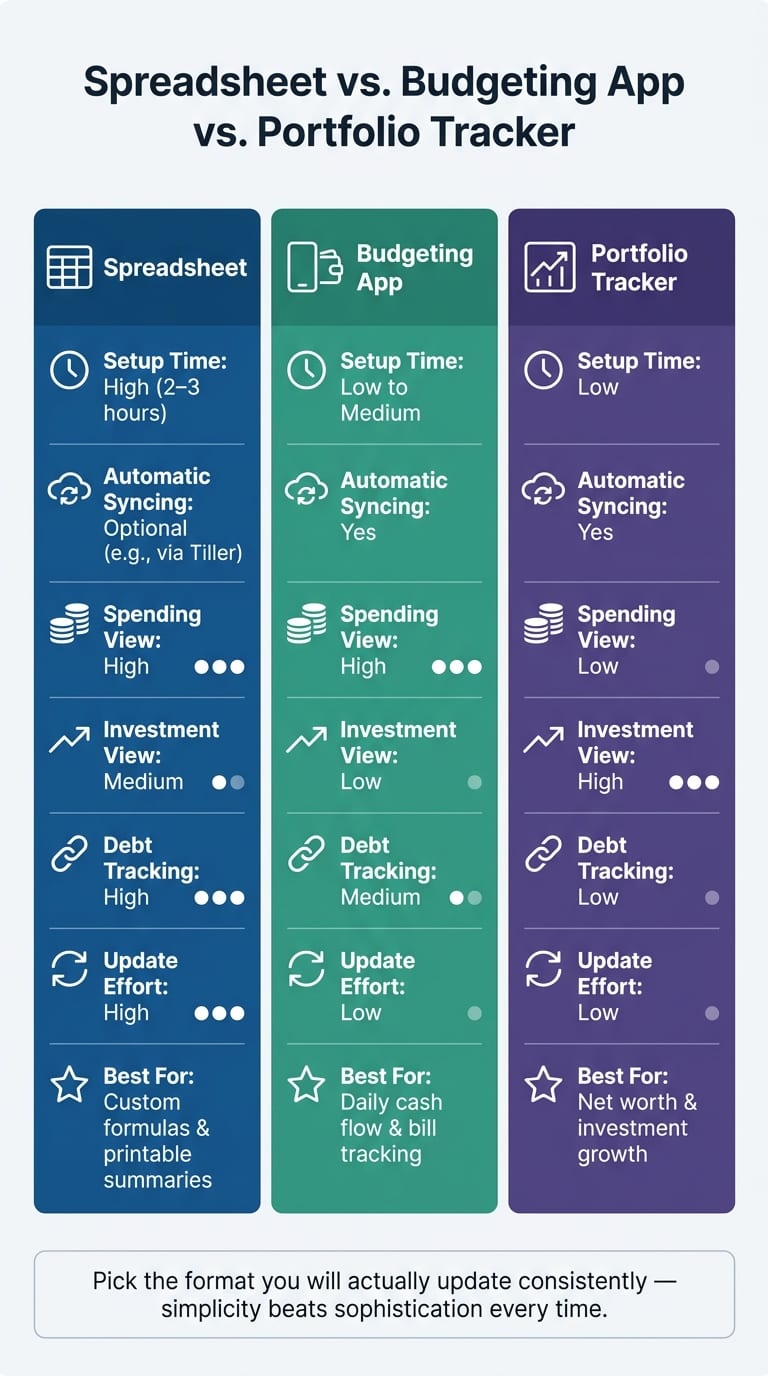
Comparison table: spreadsheet vs. budgeting app vs. portfolio tracker
Looking at the options side by side may make the choice easier. The main things to compare are setup, syncing, visibility, and effort.
Use the table to pick the simplest format you’re likely to update on a steady basis. After that, build the page around the numbers that may change most often.
Build the page with the fields that matter most
With your inventory and format set, fill the page from top to bottom. A simple layout may make this easier to scan and keep up with. Use three stacked zones: balances, cash flow, and obligations. Each one answers a plain-English question: what you own and owe, whether the month may end with money left over, and what may need attention next.
Top section: cash, account balances, and net worth
Start with current balances. Group accounts by purpose, not by institution. That way, the page may reflect how your money is actually used instead of where it happens to sit.
Show the current balance for every account.
Then add four summary lines under the account rows:
- Total Cash
- Total Investments
- Total Debt
- Net Worth
Also include an as-of date - for example, 06/22/2026. That small detail may help you spot stale numbers right away.
Middle section: monthly income, fixed costs, and variable spending
This zone works as your monthly snapshot. Track take-home pay as one number, then subtract two buckets: fixed costs and variable spending. What’s left may give you a fast read on whether the month looks positive.
"A perfect plan that you follow 30 percent of the time will always lose to a simple plan that you follow 100 percent of the time." - Peter Daisyme, Co-Founder, Hostt
Keep the categories tight. On the dashboard, use one Variable Spending line instead of breaking it into a long list. The point here isn’t detail for detail’s sake. It’s a page you may keep updated without much friction.
After cash flow, move to what may be due next.
Bottom section: debt due dates, upcoming obligations, and portfolio watch items
The bottom zone tracks due dates and watchlist items. For each debt, list the due date, minimum payment, APR, and target payoff date. That setup may make it easier to sort through payoff approaches such as the avalanche method or the snowball method.
Add large upcoming expenses too, so they may be less likely to catch you off guard.
Under that, keep a short watchlist for non-urgent issues tied to taxes, concentration, or rebalancing. Common items include concentrated stock exposure, idle cash, overlapping ETF exposure, wash sale risk, or an upcoming Roth conversion window. Mezzi may surface cross-account issues such as tax-placement gaps and wash sale risks automatically.
Once these fields are in place, weekly updates may take only a few minutes.
Set a review routine and use the dashboard to catch gaps faster
Once the dashboard is built, the last step may be keeping it up to date. A fixed weekly, monthly, and quarterly review may make that easier.
Use a weekly and monthly update cadence
A 10-minute weekly check may be enough to stay on top of near-term cash. Pick one set time each week and use it to confirm balances, scan transactions, verify autopay coverage, and add any one-time bill. The goal may be to catch urgent items before they slip through. Use the weekly check for immediate cash flow. Use the monthly review for totals and trends.
The monthly review - about 20–30 minutes - may be the point where you update balances, recalculate net worth, and compare actual spending against your targets. Log 2–3 bullets on overspending, milestones, or other surprises. Over time, those notes may reveal patterns that a single month may not show on its own.
Monthly updates track what changed. Quarterly reviews focus on what may change next. Once a quarter, set aside 30–45 minutes for bigger-picture questions. Use the quarterly review for allocation, debt payoff, taxes, and retirement progress.
Use the page to catch mistakes and make faster decisions
A current dashboard may make problems easier to spot. Excess idle cash sitting in a low-yield checking account, spending categories drifting upward month over month, or a credit card balance quietly growing may be easy to miss when your finances are spread across multiple logins. On one page, they stand out more clearly.
A few things may be worth scanning at each review:
- Duplicate or forgotten subscriptions showing up across different cards
- Large upcoming expenses, like property taxes or insurance premiums, without matching cash buildup on the page
- Portfolio concentration in a single stock or sector
Use one checklist: idle cash, spending drift, new debt, concentration.
If you use a single synced view like Mezzi, you may keep balances, transactions, and holdings in one place. Since balances, transactions, and holdings update automatically, the weekly and monthly cadence may become less about manual entry and more about interpretation and decision-making.
Conclusion: one page, full visibility, fewer blind spots
One page may give you the full picture and may surface problems before they grow.
FAQs
How detailed should my one-page dashboard be?
Detailed enough to give a clear financial snapshot, but concise enough to stay actionable. For many people, that may come down to seven core sections: net worth, cash flow summary, savings rate, debt summary, insurance coverage, annual goals, and a specific focus for the current quarter.
Each section may work best with just a few key numbers, not dense charts or every last detail. The goal may be a high-level view of your U.S. dollar balances and progress.
What if some accounts don’t update automatically?
If an account doesn’t update on its own, enter the current balance by hand so your dashboard may stay up to date. That may come up more often with smaller financial institutions.
Just sign in to the account, check the current value, and add it to your spreadsheet. It takes a bit of extra work, but it may help keep your full financial picture in one place for more informed decisions.
How often should I update your one-page money snapshot?
If you use an automated platform like Mezzi, updates may show up on a regular basis. So when you're making a financial decision, it may make more sense to check your dashboard in that moment instead of sticking to a fixed schedule.
If you track things by hand in a spreadsheet, monthly updates may be enough for many people. A weekly check-in may help with spending or automation. But monthly or quarterly reviews may be better for spotting patterns and adjusting a longer-term plan.
Disclosures:
- This content is for informational purposes only and does not constitute investment advice or a recommendation to buy or sell any security.
- Past performance is not indicative of future results. No guarantee of future performance or outcomes is implied.
Related Blog Posts
- Personal finance for couples: How to manage your finances and investments together
- Too much cash check: aside from my HSA and long-term-care accounts, am I keeping excess idle cash?
- How to build a personal balance sheet (and why you should)
- What is a financial dashboard and do you need one
Detailed enough to give a clear financial snapshot, but concise enough to stay actionable. For many people, that may come down to seven core sections: net worth, cash flow summary, savings rate, debt summary, insurance coverage, annual goals, and a specific focus for the current quarter.
Each section may work best with just a few key numbers, not dense charts or every last detail. The goal may be a high-level view of your U.S. dollar balances and progress.
If an account doesn’t update on its own, enter the current balance by hand so your dashboard may stay up to date. That may come up more often with smaller financial institutions.
Just sign in to the account, check the current value, and add it to your spreadsheet. It takes a bit of extra work, but it may help keep your full financial picture in one place for more informed decisions.
If you use an automated platform like Mezzi, updates may show up on a regular basis. So when you're making a financial decision, it may make more sense to check your dashboard in that moment instead of sticking to a fixed schedule.
If you track things by hand in a spreadsheet, monthly updates may be enough for many people. A weekly check-in may help with spending or automation. But monthly or quarterly reviews may be better for spotting patterns and adjusting a longer-term plan.