A digital estate may hold more than $55,000, yet many families may still have no written plan for crypto, domains, email, cloud files, or paid accounts. When access details are missing, heirs may face lockouts, missed renewals, lost keys, and accounts that may be deleted after inactivity.
Here’s the short version:
- List every digital asset you own or control
- Separate ownership records from login details
- Keep passwords and seed phrases out of your will
- Name someone with legal authority to handle digital assets
- Use platform legacy tools where they exist
- Review the plan at least once a year
This article comes down to three things:
- Find the assets - crypto wallets, exchanges, domains, email, cloud storage, social media, payment apps, and subscriptions
- Document access safely - password managers, backup codes, device locations, and letters of instruction
- Cover the legal side - wills, trusts, powers of attorney, and state rules such as RUFADAA, which may affect what a fiduciary may access
A few facts set the tone:
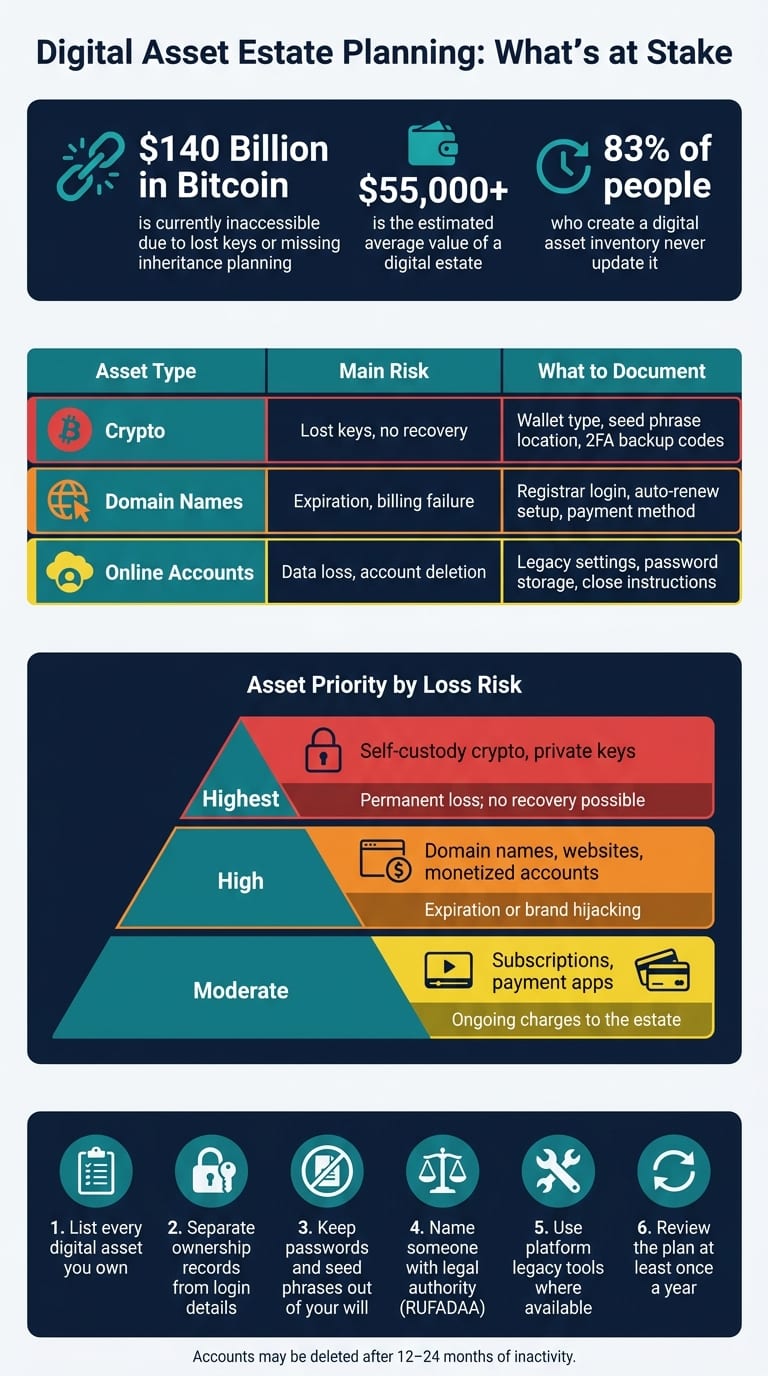
- An estimated $140 billion in Bitcoin may already be inaccessible due to lost keys or missing inheritance planning
- Many providers may delete inactive accounts after 12 to 24 months
- 83% of people who make a digital asset inventory may never update it
If I had to sum it up in one line: digital assets may be easy to forget, but they may also be easy to lose.
The goal may not be to make the plan long. It may be to make it clear enough that someone else may follow it when it counts.
How to Build a Complete Digital Asset Inventory
Once you know these assets exist, the next step is simple: write them down in a way an executor may actually use.
List Every Asset, Account, and Access Point
For each item, note the asset itself, the account that controls it, and the device, key, or app needed to get in. A plain list often works best.
Move through accounts in a clear order. Start with crypto wallets and exchange profiles, domain registrar logins, and main email and cloud accounts. Then add the tools that open the door to everything else, like password managers, authenticator apps, and hardware security keys such as a YubiKey.
For each entry, include:
- platform
- asset type
- estimated value
- where access instructions are stored
That may sound basic, but it may save a lot of confusion later.
Document Ownership and Access Details Separately
Ownership and access are not the same thing. When people mix them together, problems may follow. A domain name, for example, may become unusable if the registrar login is tied to an email account no one may reach.
A cleaner setup may look like this:
- One record for ownership details: platform, account name, linked recovery email, and renewal date
- A separate record for credentials: where the login details live, such as a password manager vault or a sealed envelope in a secure safe
Keep actual passwords and crypto seed phrases out of a will. Wills become public documents during probate, which may expose that information to anyone who searches the court record.
It also makes sense to note the 2FA method tied to each account, whether that’s an authenticator app, SMS, or a hardware key. Add where backup recovery codes are stored too. This small detail may be easy to miss, yet it may stop heirs from getting through even a basic password reset.
Rank Assets by Loss Risk and Financial Impact
Not every asset needs the same level of attention. A simple way to sort them is by two filters: financial value and recovery difficulty.
Self-custodied crypto usually sits at the top of the list because recovery may be impossible. There may be no customer service team and no password reset option. Business-critical domain names often come next. If they expire, someone else may register them and take over the brand or revenue stream. Email accounts, cloud photo libraries, and social profiles also matter because they may disappear or lock heirs out.
Recurring subscriptions belong in the inventory too, since an executor may need that list to stop billing without delay.
The assets with the highest downside may deserve the clearest access notes and the most direct handoff plan.
Planning for Crypto, Domains, and Online Accounts
Once you’ve built an inventory and ranked assets by risk, the next step may be to handle each category on its own terms. Crypto, domain names, and online accounts tend to fail in different ways. That usually means each one needs a different setup.
Cryptocurrency: Document Keys, Wallets, and Exchange Access
The main split is whether your crypto sits on an exchange or in a self-custody wallet. If it’s on an exchange, an executor may contact the platform, submit a death certificate, and go through the estate process. If it’s in a self-custody wallet, there’s no support team and no reset option. A self-custody wallet may become unrecoverable if the device, recovery phrase, or backup codes are lost.
For exchange accounts, document:
- The platform
- The account name
- The login email
Store the password and two-factor authentication (2FA) backup codes in a password manager with emergency access.
For hardware wallets, write down the device type, its exact physical location, and where the recovery phrase is stored. Keep the recovery phrase on a metal backup in a separate location from the device itself. Do not put seed phrases or private keys in a will.
For larger balances, some people use a 2-of-3 multisignature wallet so no single lost key blocks access.
Domains fail in a different way. They usually depend on renewal control, billing access, and the registrar account.
Domain Names: Protect Ownership and Renewal Control
Domain names are often lost when heirs may not reach the registrar, billing email, or auto-renew payment method. Document the registrar, account username, associated login email, and which payment method is linked to auto-renew. Also note where 2FA backup codes are stored. Without them, account lockout may be permanent even with the correct password.
A will or trust may name someone with authority to renew and transfer the domain. For domains tied to a business or personal brand, some people consider holding them in a trust so a successor trustee may act right away, without waiting for probate to conclude.
If a domain generates revenue through affiliate marketing or e-commerce, the estate plan may name someone who understands the technical mechanics of a transfer, not just a general executor.
Online accounts need a different plan too. The key move may be deciding what to transfer, memorialize, archive, or close.
Online Accounts: Decide What to Transfer, Close, or Archive
Email, cloud storage, and social accounts should each have one clear estate instruction. The goal isn’t to treat every account the same. It’s to give each one a single action.
Use each platform’s legacy or inactive-account tools first, then document the rest in writing. That may mean setting up Google's Inactive Account Manager and Facebook's Legacy Contact feature before drafting a letter of instruction.
Assign each account type one action:
One simple way to find subscriptions is to search the primary inbox for "receipt" or "subscription".
How to Document Access and Name the Right Fiduciaries
Your inventory may not do much if no one knows where the keys are, how to renew the domain, or how to get into the accounts. Once the inventory is done, the next step is simpler: decide who may access it and who may legally act.
Use Secure Tools Instead of Putting Credentials in Estate Documents
Do not put passwords, seed phrases, or security answers in a will. A password manager may be a better place to store credentials, 2FA backup codes, and secure notes. Then keep the master password in a fireproof safe or in a sealed envelope with your attorney. A separate letter of instruction may show the fiduciary where each account, device PIN, and hardware wallet is stored.
For crypto seed phrases and hardware wallet PINs, use a physical safe or secure vault. Do not store them in an unencrypted file.
That said, access notes may not do much on their own. The legal documents still need to give the right person authority.
Update Wills, Trusts, and Powers of Attorney to Cover Digital Assets
Your legal documents need to do one thing here: give clear authority. General wording may not be enough. Your will, trust, and durable power of attorney should specifically authorize your fiduciary to "access, manage, and receive disclosure of digital assets and electronic communications".
Two points may matter most:
- Under RUFADAA, which had been adopted by 48 states as of 2026, fiduciaries may access a catalog of communications without special authorization in many cases. But access to the content of those messages may require explicit language in your documents.
- A durable power of attorney should include digital asset language for incapacity, not only death. If you are alive but unable to manage your accounts, your agent may need that authority spelled out to pay bills online or access cloud files.
Use platform legacy tools first, then use your estate documents to cover the gaps.
Choose Fiduciaries Who Can Actually Execute the Plan
The person you name matters just as much as the documents. A fiduciary dealing with digital assets should be organized, trustworthy, and at ease with password managers and 2FA. If your main executor is not tech-savvy, some people name a separate digital executor to recover crypto, renew domains, and get into email and cloud accounts fast, while the main executor handles the legal and financial side.
Name a crypto-savvy backup for any wallet or exchange account. Also name at least one alternate in case your first choice is unavailable.
A simple test may tell you a lot: ask your chosen fiduciary to do a dry run. They may try to find the letter of instruction, locate the password manager, and confirm they may access the stored instructions. If they get stuck, revise the instructions now.
Keep the Plan Current Over Time
Set an Annual Review and Event-Based Update Schedule
Once the plan is written, the hard part may just be keeping it current. A digital estate plan may change right along with your accounts. Passwords get updated. Crypto may move to new wallets.
83% of people who create digital asset inventories never update them, which may leave those records stale within a year.
Some people review their plan quarterly to check for new accounts and contact changes. Then they do a full annual review of fiduciaries, legal authority, legacy settings, and storage locations.
It may also make sense to update the plan right after major changes, such as:
- moving crypto to a new wallet
- changing registrars or phones
- making a large crypto purchase
- going through marriage or divorce
- finding out that a named digital executor may no longer be available or may not have the technical skills to act
At each review, verify seed-phrase storage, hardware wallet PINs, 2FA backup codes, and the location of the letter of instruction.
Use Mezzi to Keep Your Financial Picture in One Place
Keeping a digital asset inventory accurate may be easier when your full financial picture sits in one place. Mezzi’s read-only account aggregation brings financial accounts together, including crypto, so you may spot gaps in your inventory and review concentration and tax exposure in one view. Mezzi provides read-only guidance, not transactions, and never uses your passwords.
That single view may make stale or missing accounts easier to catch.
Conclusion: Give Your Heirs a Clear Path Forward
Identify every digital asset. Document ownership and access details in a secure location separate from your will. Give your fiduciaries explicit legal authority in your estate documents. Then review the plan regularly so it reflects your actual accounts.
Skipping this work may come with real costs. An estimated $140 billion in Bitcoin is currently inaccessible due to lost keys or lack of inheritance planning. Domain names may expire, and online accounts may become inaccessible without clear instructions. A current plan may reduce the odds of lost assets and guesswork.
A clear, current digital estate plan does not need to be complicated. It needs to be honest about what you own, specific about where access lives, and updated often enough that your heirs are never left guessing.
FAQs
What counts as a digital asset?
A digital asset is any electronic record, account, or property that you own, control, or possess in digital form. It may carry financial value, personal value, or a mix of both.
Common examples include financial assets like cryptocurrency and online accounts, business assets like domain names and websites, personal assets like email and cloud storage, and access-only accounts like subscriptions and memberships.
Can my executor legally access my online accounts?
Not automatically.
An executor may manage your estate, but that authority may not extend to the content inside your online accounts. Privacy laws and platform terms may block access to private emails, direct messages, photos, or stored files unless you gave consent ahead of time.
To grant legal authority, some people include digital asset instructions in a will, trust, or power of attorney. It may also make sense to review each platform’s legacy or account-transfer tools, because those settings may override what your will says.
Where should I store crypto seed phrases and passwords?
For general online accounts, some people use a reputable password manager to store login details and recovery codes. That setup may also support emergency access for fiduciaries, which may make account access easier if someone else needs to step in.
Crypto seed phrases and private keys may call for more care. Many people choose not to store them online. Instead, they may keep them in a secure physical spot, like a safe or safe deposit box, and list that location in a digital asset inventory without including the keys themselves.
Disclosures:
- This content is for informational purposes only and does not constitute investment advice or a recommendation to buy or sell any security.
- Past performance is not indicative of future results. No guarantee of future performance or outcomes is implied.
Related Blog Posts
- Digital Assets in Estate Planning: Key Steps
- Future of Digital Estate Planning with AI
- Joint Accounts and Conflicts in Inheritance
- AI vs. Manual Tracking for Digital Estate Planning
A digital asset is any electronic record, account, or property that you own, control, or possess in digital form. It may carry financial value, personal value, or a mix of both.
Common examples include financial assets like cryptocurrency and online accounts, business assets like domain names and websites, personal assets like email and cloud storage, and access-only accounts like subscriptions and memberships.
Not automatically.
An executor may manage your estate, but that authority may not extend to the content inside your online accounts. Privacy laws and platform terms may block access to private emails, direct messages, photos, or stored files unless you gave consent ahead of time.
To grant legal authority, some people include digital asset instructions in a will, trust, or power of attorney. It may also make sense to review each platform’s legacy or account-transfer tools, because those settings may override what your will says.
For general online accounts, some people use a reputable password manager to store login details and recovery codes. That setup may also support emergency access for fiduciaries, which may make account access easier if someone else needs to step in.
Crypto seed phrases and private keys may call for more care. Many people choose not to store them online. Instead, they may keep them in a secure physical spot, like a safe or safe deposit box, and list that location in a digital asset inventory without including the keys themselves.