
Leaving Fidelity Full View? Here's what you need to know:
- Why Leave? Many users face reliability issues like failed connections with banks or brokerages, limited analytics, and removed features (e.g., rewards tracking and bill management).
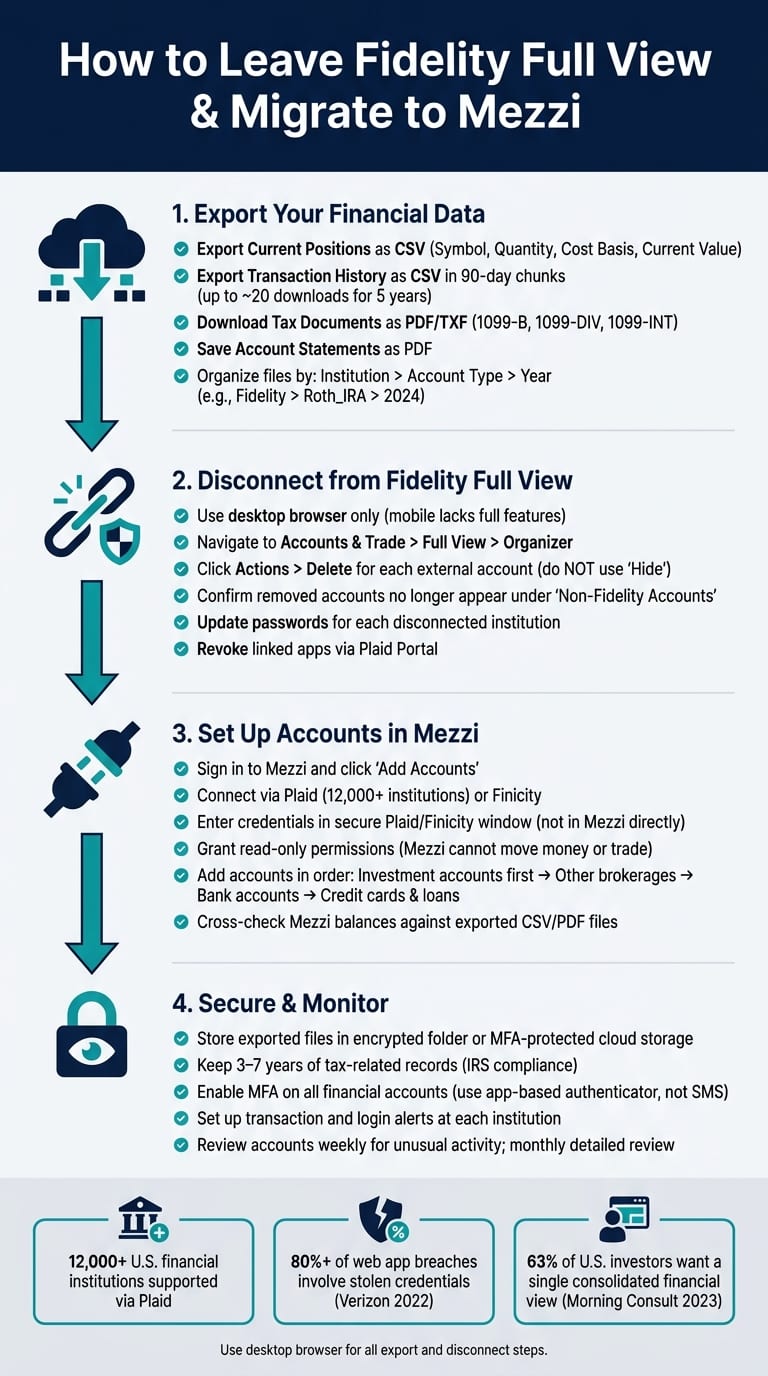
- Export Your Data: Download holdings, transaction history, tax records, and account statements. Use CSV for positions/transactions and PDFs for statements.
- Disconnect Safely: Remove external accounts from Full View via Fidelity’s desktop site. Deleting accounts ensures they no longer sync.
- Switch to Mezzi: A paid tool offering features like portfolio overlap analysis, tax-loss harvesting suggestions, and retirement projections.
Tip: Keep your exported files secure with encryption and review Mezzi’s data for accuracy post-migration. Regularly monitor accounts for security and accuracy.
Exporting and Preserving Your Financial Data
Export your data now; once disconnected, recovery is impossible.
What Data You Should Export
Make sure to save these four key data types: current holdings (positions), transaction history, tax-related records, and official account statements. Here's why each one matters:
- Holdings: These provide a snapshot of what you own, including ticker symbols, quantities, and cost basis.
- Transaction History: This includes every buy, sell, dividend, and transfer - essential for tracking your activity.
- Tax Records: Realized gain/loss reports and cost basis details are critical for audits or reconstructing filings.
- Account Statements: PDF statements and 1099s offer a long-term paper trail for your records.
How to Download Data from Fidelity Full View
Use a desktop browser for this process, as the mobile app lacks full export capabilities.
- For holdings: Go to Accounts & Trade > Portfolio, click the downward arrow in the upper-right corner, and select CSV.
- For transactions: Navigate to Activity & Orders > History, choose a "Custom" date range, and download. Note that Fidelity limits transaction exports to 90-day periods. To capture your full history, you’ll need to export multiple 90-day segments and combine them. Fidelity retains transaction archives for up to 5 years, which may require around 20 downloads to cover the entire period.
"Fidelity caps each transaction download at 90 days, which catches everyone off guard if you're migrating years of trade history - you'll need to run the export multiple times in 90-day chunks and merge the files." - Arden
For employer-sponsored 401(k) accounts, CSV exports may not be available. In these cases, download PDF statements instead.
Once you've downloaded your data, organize it securely for future access.
How to Organize and Store Exported Files
A clear, consistent folder structure is key to keeping your files in order. Start by organizing files by institution, then by account type, and finally by year. For example: Fidelity > Roth_IRA > 2024. For individual files, use descriptive names like 2024-Q1_Fidelity_RothIRA_Transactions.csv so you can quickly locate what you need.
Store your files in a secure location - not just on your desktop. Options like an encrypted cloud folder or a password-protected external drive are ideal. Since CSV files contain sensitive data, treat them with the same care as any financial document. While Fidelity retains statements online for up to 10 years and tax forms for up to 7 years, maintaining your own copies ensures you're not reliant on their portal. These steps will help you keep your financial history intact and ready for any future needs, including importing into Mezzi.
How to Disconnect Fidelity Full View Safely
Disconnecting from Fidelity Full View involves removing linked external accounts and ensuring they no longer contribute to your aggregated totals.
Full View vs. Your Core Fidelity Accounts
Fidelity Full View operates as a separate account aggregation tool, distinct from your core brokerage accounts. Managed by eMoney Advisor, LLC, a Fidelity affiliate, it functions under its own set of Terms of Service and Privacy Policy. Essentially, Full View acts as a dashboard that reads account data but does not have the ability to move money or execute trades.
"Full View® is an account aggregation service (the 'Service') operated by eMoney Advisor, LLC, a Fidelity affiliate. The Terms of Service, Privacy Policy, and Security Policy that govern your use of Full View differ from those applicable to your experience at Fidelity." - Fidelity Investments
Disconnecting from Full View does not impact your actual brokerage holdings.
How to Remove Linked External Accounts
To fully remove accounts, use a desktop browser, as some features are unavailable on mobile. Here are two effective methods:
Using the Full View Organizer:
- Log in to Fidelity and navigate to Accounts & Trade > Full View.
- Click Organizer (above the welcome message).
- In the Accounts section, locate the external account, click Actions, and then select Delete.
Using the Portfolio Summary:
- Go to Accounts & Trade > Portfolio > Summary.
- Locate the non-Fidelity account listed.
- From the Select Action drop-down menu, choose Delete.
"To remove accounts from the Portfolio > Summary screen choose the Delete option from the Select Action drop-down list for the account. Note that this will remove the account from the Full View® application as well." - Fidelity.com Help
Avoid using the "Hide" option - it only masks the account. To disconnect completely, select Delete.
Once accounts are removed, confirm they no longer appear in your Full View totals.
How to Confirm Full View is Fully Disconnected
Check that removed accounts no longer appear under "Non-Fidelity Accounts" and ensure your Net Worth and Cash Flow totals exclude their balances. If you previously encountered errors, such as "unable to provide external digital account information", confirm these messages no longer appear.
After verifying disconnection, take additional steps to secure your accounts. Update passwords for each institution and use the Plaid Portal to disconnect any linked apps by selecting "Disconnect app."
How to Set Up Your Accounts in Mezzi
Now that you've removed your external accounts from Fidelity Full View, it's time to bring everything together in Mezzi. Setting up your accounts is simple, especially if you've ever linked a bank account to a budgeting app.
How to Connect Your Accounts to Mezzi
Start by signing in to Mezzi and navigating to "Add Accounts". From there, you can connect your accounts using Plaid or Finicity. These platforms securely link your credentials without exposing them to Mezzi. Plaid connects with over 12,000 U.S. financial institutions, so you’ll likely find your banks, brokerages, and retirement account providers.
When you choose an institution - such as Fidelity, Vanguard, or Chase - a secure window hosted by Plaid or Finicity will open. You'll enter your login credentials there, not directly in Mezzi, ensuring an added layer of security. After completing any required two-factor authentication, you'll grant read-only permissions. This allows Mezzi to access your balances, holdings, and transactions, but it cannot move money or make trades.
To streamline the process, start with your primary investment accounts (like Fidelity brokerage, IRAs, or 401(k)s). Then, add other brokerages, followed by checking and savings accounts, and finally credit cards and loans. This approach helps Mezzi quickly build a full picture of your net worth.
What Mezzi Can Do With Your Connected Data
Once your accounts are synced, Mezzi offers more than just a snapshot of your balances. Its AI engine analyzes data across all your accounts simultaneously, offering insights that single-custodian tools like Full View can't match.
Here are a few ways Mezzi puts your data to work:
- Portfolio X-Ray: Mezzi examines your holdings to identify overlapping positions. For instance, if you own VTI in a Vanguard IRA and FXAIX in a Fidelity 401(k), Mezzi might reveal that your portfolio is heavily weighted - up to 70% - in U.S. large-cap growth, even though the funds appear different.
- Tax optimization suggestions: Mezzi highlights opportunities for better asset location. For example, it may flag a high-yield bond fund generating ordinary income in a taxable account and suggest it might be more efficient in a traditional IRA.
- Retirement projections: Using your actual balances and contribution rates, Mezzi models scenarios like how increasing your 401(k) contribution from 8% to 12% could impact your retirement income at age 67.
As an SEC-registered fiduciary, Mezzi is legally required to act in your best interest. While it provides advice, you maintain control over decisions and actions.
Cross-Check Mezzi's Data Against Your Exported Files
Before relying on Mezzi’s insights, take a few moments to verify its data against the CSV or PDF files you exported from Fidelity Full View. Compare both sets of data on the same day to ensure account balances align. Small differences are normal due to market fluctuations and sync timing, but significant discrepancies or missing accounts should prompt a re-sync or a quick check with Mezzi’s support team.
Pay close attention to share counts, ticker symbols, and cost basis in your investment accounts. For example, if Mezzi shows 95 shares of a fund but your export lists 100, investigate further before acting on any tax or rebalancing recommendations. Also, confirm that accounts you intentionally removed from Full View aren't being reconnected due to outdated links. Once you’ve verified your data, you’ll be ready to secure your financial information in Mezzi.
How to Keep Your Financial Data Secure After the Switch
With your accounts now integrated into Mezzi, safeguarding your financial data should be your next priority. After completing the migration and verifying your information, take immediate steps to secure your new connections.
Update Credentials and Enable Security Features
Start by securing your email account, as it’s the gateway for password resets and alerts. Update the credentials for all your financial accounts, ensuring each one uses a unique password between 12 and 16 characters. According to the 2022 Verizon Data Breach Investigations Report, over 80% of basic web application attacks involved stolen credentials. This underscores the importance of avoiding password reuse. A trusted password manager can help you manage this without relying on browser-stored passwords.
Enable multi-factor authentication (MFA) wherever possible. The Federal Trade Commission highlights that MFA "makes it harder for scammers to log in to your accounts even if they get your username and password." Opt for app-based authenticators instead of SMS for added security. Since Mezzi relies on Apple or Google SSO for login, your main security measure will be the MFA tied to your chosen identity provider. Mezzi explains: "Account access requires authentication through Apple or Google SSO. This eliminates password-based vulnerabilities and leverages enterprise-grade identity providers."
Additionally, visit the portals of your banks and brokerages to review connected apps and active sessions. Revoke permissions for any apps you no longer use. These steps will help secure your system and ensure your data is safely stored.
Store Financial Records Securely
Transfer CSV and PDF exports to an encrypted local folder or a secure cloud storage service that uses MFA and allows for controlled sharing. For local storage, tools like BitLocker (Windows) or FileVault (macOS) are excellent options. Ensure your device is protected with full-disk encryption and an auto-lock feature. For cloud storage, choose a service that offers encryption and robust access controls. Always handle these files with care and confidentiality.
Keep 3–7 years of tax-related records, such as statements, 1099 forms, trade confirmations, and year-end summaries, to comply with IRS regulations and be prepared for potential audits. Delete older files you no longer need to avoid leaving sensitive data in unmonitored locations.
Once your records are securely stored, shift your focus to regular monitoring.
Regularly Monitor Your Accounts and Mezzi Insights
Check your accounts weekly for any unusual activity and perform a detailed review monthly. Use Mezzi’s dashboard alongside official statements from your financial institutions to ensure accuracy. If you notice discrepancies between Mezzi’s data and your statements that can’t be explained by timing differences, investigate promptly.
Set up transaction and login alerts directly with your banks and brokerages, in addition to Mezzi’s notifications. These alerts will inform you of large transfers, new payees, or logins from unfamiliar devices. The FBI’s IC3 reported $12.5 billion in cybercrime losses in 2023, with phishing and personal data breaches being among the most common forms of attack. Signs like unexpected login alerts, untriggered MFA prompts, or unusual account activity should prompt immediate action - change your password and contact the institution’s security team right away.
Treat your connected accounts as an ecosystem that requires regular check-ins, not a set-it-and-forget-it setup. Ongoing vigilance is key to keeping your financial data secure.
Conclusion: Take Control of Your Wealth with Mezzi
You've now completed the entire migration process: exporting and organizing your financial data, securely disconnecting external accounts from Full View, reconnecting everything in Mezzi, and ensuring your security is intact. Your Fidelity brokerage, IRA, and 401(k) accounts remain unchanged - only the way you view and analyze them has shifted. With your data verified and secure, you're ready to explore the advantages Mezzi brings to the table.
Take a moment to confirm everything is set up correctly. Do you have secure backups of your exported files? Are all your key accounts - brokerage, retirement, bank, and HSA - connected to Mezzi? Have you checked that Mezzi's balances align with your exported data? If you’ve answered yes to all, your migration is complete, giving you the tools to manage your wealth more effectively.
Mezzi offers more than just basic account aggregation. As an SEC-registered investment adviser, Mezzi is bound by fiduciary duty, meaning it prioritizes your interests over everything else - no commissions, no product sales. This commitment also extends to your data:
"We aren't here to sell your data to a third party, today or ever. Our paid plan allows us to build the best product for you, while keeping all of your data private." - Mezzi
With your financial accounts fully connected, Mezzi's AI provides insights that typically require a paid advisor. It identifies concentration risks, highlights tax-loss harvesting opportunities, pinpoints asset location strategies across your Roth and taxable accounts, and evaluates your retirement readiness - all presented in U.S. dollars for clarity. According to a 2023 Morning Consult survey, 63% of U.S. investors want a single, consolidated view of their finances. Mezzi not only delivers that but also interprets the data for you. Try asking questions like, "Am I on track for retirement?" or "Where is my portfolio most exposed?" You'll get answers comparable to what a high-cost advisor might provide - only faster and more accessible.
FAQs
Will deleting accounts in Full View affect my actual Fidelity accounts or money?
No, deleting an account from Fidelity Full View won’t impact your Fidelity accounts or the funds they hold. Full View is strictly a read-only tool designed to help you track financial data. Removing an account only means it will no longer appear in the app. It does not affect your assets, balances, or ability to conduct transactions with your financial institutions.
How do I merge multiple 90-day transaction CSV exports into one file?
Fidelity restricts exports to 90-day intervals, which means you'll need to perform multiple exports for longer transaction histories. To combine these files, you can copy the data from each CSV into a single spreadsheet using tools like Excel or Google Sheets. Be sure to remove any duplicate entries during the process. If you'd prefer a more streamlined approach, consider using financial software to consolidate the files into a standardized format, such as OFX, which may simplify ongoing management.
How can I confirm Mezzi imported my balances and cost basis correctly?
To confirm that your balances and cost basis were imported accurately, cross-check the information in your Mezzi dashboard with your most recent financial account statements - preferably those from the past 90 days. Look closely to ensure balances align and holdings are properly categorized. If you spot any inconsistencies, unlink the account and then reconnect it. This process helps keep your data accurate for future analysis.
Disclosures:
- This content is for informational purposes only and does not constitute investment advice or a recommendation to buy or sell any security.
- Past performance is not indicative of future results. No guarantee of future performance or outcomes is implied.
- Registration does not imply a certain level of skill or that the SEC has approved the company or its services.
- Savings and performance examples are hypothetical and for illustrative purposes only. Actual results will vary based on individual circumstances, portfolio composition, market conditions, and fees.
- Users should not rely solely on AI-driven tools for financial decision-making.
Related Blog Posts
- How to leave Empower (Personal Capital) and where to go next
- How to leave Betterment
- How to Export Your Data from Empower (And Where to Take It)
- How to Move From Betterment to Self-Directed Investing
No, deleting an account from Fidelity Full View won’t impact your Fidelity accounts or the funds they hold. Full View is strictly a read-only tool designed to help you track financial data. Removing an account only means it will no longer appear in the app. It does not affect your assets, balances, or ability to conduct transactions with your financial institutions.
Fidelity restricts exports to 90-day intervals, which means you'll need to perform multiple exports for longer transaction histories. To combine these files, you can copy the data from each CSV into a single spreadsheet using tools like Excel or Google Sheets. Be sure to remove any duplicate entries during the process. If you'd prefer a more streamlined approach, consider using financial software to consolidate the files into a standardized format, such as OFX, which may simplify ongoing management.
To confirm that your balances and cost basis were imported accurately, cross-check the information in your Mezzi dashboard with your most recent financial account statements - preferably those from the past 90 days. Look closely to ensure balances align and holdings are properly categorized. If you spot any inconsistencies, unlink the account and then reconnect it. This process helps keep your data accurate for future analysis.