
Your net worth may show three different totals on the same day - and all three may look right. That gap may come from five common issues: stale syncs, duplicate accounts, missing debt, cash timing, and different inclusion rules.
If I wanted one number I may actually use, I’d keep it simple:
Pick one as-of date and time for every account
Use one household scope for what counts and what does not
Match positions, cash, and debt to source statements
Remove duplicate feeds and double-counted holdings
Label estimated items like real estate or private business interests
A household balance sheet may include more than investment accounts. It may also include bank cash, HSAs, 529 plans, home value, private holdings, mortgages, HELOCs, margin debt, student loans, auto loans, and credit cards. Leave out a liability like an $80,000 student loan or $100,000 margin balance, and net worth may look much higher than it may be.
Here’s the short version: one portal may show only retirement assets, another may miss debts, and an app may skip accounts or count some items twice. That means the problem may be less about math and more about timing and rules.
If I were boiling the article down to one line, it would be this: a net worth figure may be useful only when every account is measured on the same date, in the same currency, with the same inclusion rules.
Why Net Worth Totals Do Not Match
Most net worth mismatches may not come from math errors. More often, they may trace back to the same handful of issues: assets shown in ways that look confusing, debts that never make it into the total, and systems that use different rules for what belongs on the balance sheet.
Duplicate holdings, stale syncs, and cash sweep timing
The same ETF may appear in a taxable brokerage at Fidelity, a rollover IRA at Schwab, and a 401(k) at Vanguard. That alone may be fine if each account belongs in the total. Trouble may start when someone tries to tidy up a spreadsheet, sees what looks like a duplicate line, and deletes it - only to remove a real holding.
The arithmetic may still look neat on the page. But the portfolio picture may shift. A household may appear more spread out than it may be.
Timing adds another wrinkle. One app may update once a day based on the prior market close. Another may show real-time prices or prices delayed by 15 minutes. On a volatile day, the same holding may look far apart across two dashboards.
Cash sweep programs may muddy the picture too. The same $25,000 may show up as cash in one system and as $10,000 cash + $15,000 other investments in another. Unsettled trades may create short periods where both a sold position and the cash from that sale appear in the same view, which may temporarily inflate the total.
Missing liabilities and buried leverage
According to the Federal Reserve's Survey of Consumer Finances, among U.S. households carrying debt, the conditional median debt is $80,200 and the mean is $163,800.[8] One analysis found that 43% of financial app users report net worth discrepancies greater than $50,000.[6][7]
A few issues show up again and again:
Mortgages and HELOCs held at a different institution than the main brokerage
Margin loans shown only inside buying power notes instead of as a separate debt line
Credit cards where the app pulls last month's statement balance instead of the current balance
A household running $15,000 in monthly charges with partial payments may end up with a very different net worth total depending on which balance gets recorded.
Margin debt may be one of the easiest items to miss. A portfolio that shows $300,000 in securities with a $100,000 margin loan outstanding may display only the $300,000 market value in a headline summary. That may overstate net worth by $100,000.
Account classification rules that quietly change the total
Two systems may both be internally consistent and still show different household totals because they don't count the same things.
A business checking account with $50,000 may be included in one tool and excluded as "non-household" in another. Employer stock plans may create similar gaps. One planning system may include unvested RSUs and ESPP shares, while another may only pull in the brokerage account holding vested shares. 529 college savings plans are another repeat source of divergence: some planners include them in household net worth, while others treat them as earmarked funds outside the parents' core balance sheet.[1][2][3][4][5]
That’s why two people looking at the same household’s finances on the same day may land on different numbers without either person making a mistake. The issue may not be bad data. It may be different rules, applied the same way each time. Fixing the mismatch often starts with understanding those rules, not just hitting refresh.
A Step-by-Step Reconciliation Checklist
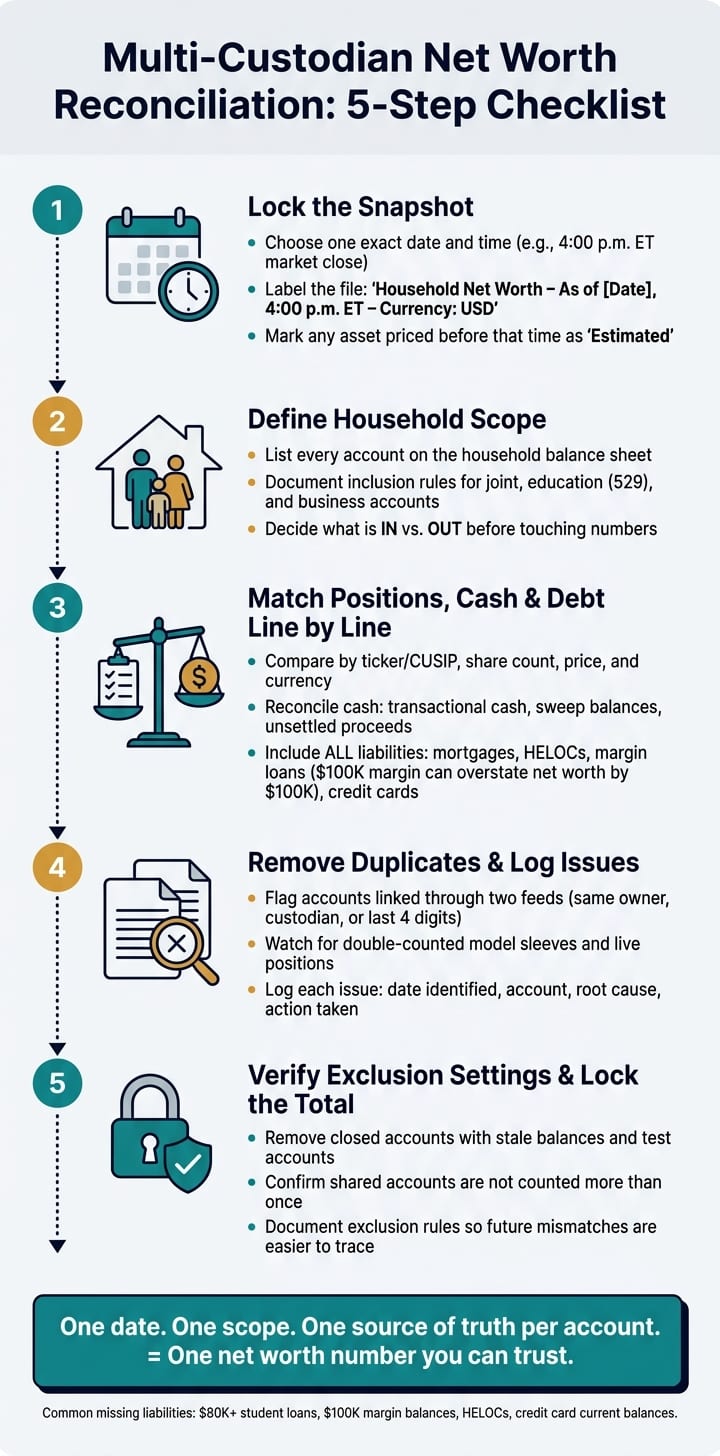
Set the date, scope, and source data first
Before you touch the numbers, lock the snapshot. Pick one exact date and time and use it across the whole workbook. For example: the 4:00 p.m. ET market close on 08/16/2026. Then label the file in plain English: Household Net Worth Reconciliation – As of 08/16/2026, 4:00 p.m. ET – Currency: USD. If any asset was priced before that time, mark it as estimated. If you hold non-USD assets, convert each one to USD with one FX rate from that same snapshot.
Next comes scope. The aim here may be one household total, not a separate total for each custodian. Write down every account that belongs on the household balance sheet. Then spell out what gets included and what does not, especially for joint accounts, education accounts, and business holdings. A simple table may keep this clean:
| Account | Custodian | Owner | Included in Net Worth | Notes |
|---|---|---|---|---|
| Rollover IRA | Brokerage custodian | Primary | Yes | - |
| 529 Plan | Education account custodian | Primary | Yes | Education asset |
| Business Checking | Bank | Primary | No | Excluded |
| HELOC | Lender | Joint | Yes | Liability |
If you track manual assets like real estate or private equity, record the valuation date and method in a separate field. That may keep those items lined up with the rest of the sheet. It also may reduce quiet account adds, drops, or category mistakes.
Once the snapshot is set, reconcile every account to that same point in time.
Match each account's positions, cash, and debt line by line
With scope locked, pull custodian statements or end-of-day exports for the as-of date. In most cases, the custodian statement may serve as the benchmark.
Go account by account. Compare positions by ticker or CUSIP, share count, price per share, and currency. If share counts do not match, check for unsettled trades, dividend reinvestments, or partial lots that may not have cleared yet. If shares match but prices differ, the tool may be using delayed data or prior-day pricing.
Review cash on its own. Look at transactional cash, sweep balances, money market funds, pending transfers, and unsettled proceeds. Then check every liability. Mortgages, HELOCs, margin loans, and credit cards may need to appear as debt, not as negative cash and not as a missing account.
After balances line up, move to duplicate feeds and exclusion rules.
Log duplicates and exclusion settings before trusting the total
Even when positions match, the total may still move because of duplicates or exclusions. The same account may show up twice if it is linked through two feeds. The same holding may also be counted twice when both a model sleeve and live positions are included. Look for accounts with the same owner, custodian, or last four digits listed more than once.
Keep a duplicate and issues log next to the workbook. For each item, record:
The date identified
The account involved
The root cause
The action taken
Review exclusion settings too. Closed accounts with stale balances, test accounts, and shared accounts counted more than once may distort the household total. Write those settings down so the next mismatch may be easier to trace.
How to Consolidate Data Without Losing Control
The goal isn't more data. It's one net worth number you may trust.
Manual tracking versus professionally managed reconciliation
Once you have a reconciliation checklist in place, the next step is figuring out how to keep it running. Most affluent households may end up using one of two paths.
Manual spreadsheets offer full visibility. Every formula is yours, every classification choice is documented, and you may lock a snapshot to any date you choose. The downside is time and error risk. Pulling statements and CSVs from several custodians may take hours each month, and formula mistakes or stale inputs may pile up fast.
Professionally managed reconciliation moves the day-to-day work to a professional who uses daily or intraday account feeds, processes corporate actions, and resolves breaks from exception reports before producing a household balance sheet. The system may flag breaks on its own instead of waiting for someone to notice them. The tradeoff is dependence on professional infrastructure, and an individual household may find it harder to reproduce the same process on its own.
| Dimension | Manual Spreadsheets | Professionally Managed Reconciliation |
|---|---|---|
| Effort (household) | High - regular imports and formula upkeep | Low to medium - delegated to advisor or operations team |
| Update frequency | Periodic or ad hoc | Often daily or intraday |
| Error risk | High - formula errors, missed accounts, stale inputs | Medium to low - systematic exception reporting |
| Visibility into complex holdings | Limited for alternatives, leverage, and private funds | Strong - built for multi-entity, multi-custodian complexity |
For households with a manageable number of accounts and straightforward holdings, a well-kept spreadsheet may work. For households with entities, leverage, or alternative investments, professionally managed reconciliation may produce a more dependable number.
The real test is simpler than it sounds: does the process keep one as-of date, one scope, and one set of inclusion rules?
What AI can catch in a multi-custodian household
AI may add the most value when it catches breaks before they distort the total.
AI-driven aggregation uses read-only connections to custodians, updates more often than a manual spreadsheet, and applies machine learning to flag discrepancies across linked accounts. In practice, AI may:
Flag stale or broken connections when an account hasn't updated within a normal window
Identify duplicate holdings and ETF overlap by analyzing security identifiers across custodians
Infer missing liabilities by spotting recurring interest payments that don't match any recorded loan
Detect wash sale risk across accounts by matching tax-lot-level transactions across the IRS 30-day window
Its role is analysis and discrepancy detection, not execution. It points to what may need a closer look. You decide what, if anything, to do next.
How Mezzi helps produce a cleaner household balance sheet

For households that want automated detection without giving up control, read-only tools may keep reconciliation more consistent.
Mezzi is an SEC-registered fiduciary that connects 401(k), IRA, Roth IRA, taxable brokerage, HSA, trust, and other accounts through read-only access via Plaid and Finicity. Access is read-only, so your assets stay where they are; Mezzi provides advice and insights, and you keep custody and control.
You may view accounts together or separately, which may help you check what's included in the total. Mezzi's X-Ray feature surfaces overlap across linked accounts, which may make it easier to confirm what's driving the household total. Its tax insights may flag tax-inefficient holdings and potential asset location improvements. These tax-related insights are informational and not individualized tax advice.
Conclusion: Build One Net Worth Number You Can Actually Use
If your totals still don’t match after reconciliation, the reason may come down to one of five common issues: stale syncs, duplicate accounts, missing liabilities, cash timing, or inconsistent classification. A net worth total may only be as reliable as the data behind it.
The fix may be simple in theory, even if it takes a bit of cleanup: use one valuation date, one scope, and one source of truth for each account. Without that consistency, a net worth figure may shift overnight just because one custodian feed updated and another didn’t.
Reconciliation doesn’t stop after one pass. Holdings change, transfers may post late, feeds may break, and liabilities may show up later. That’s why some people review monthly or quarterly and keep the process on a set schedule.
Before relying on the number, do one last check:
Confirm linked accounts
Match positions and cash to source statements
Include all liabilities
Remove duplicates
Lock scope before using the total
A net worth number may be more useful for planning when account feeds are clean, classification rules stay consistent, and the process is repeatable. The goal isn’t a lucky estimate. It’s one number you may actually use with confidence.
FAQs
Which net worth number should I trust?
No single number may be all that trustworthy when your financial data lives in different places. A net worth total may only be as reliable as the information pulled in from your accounts, so one delayed sync or inaccurate account connection may throw off the entire picture.
A more dependable view may come from three basics:
Including all assets and liabilities
Keeping the data current
Making sure holdings are categorized correctly
If even one account is missing, outdated, or mislabeled, the total may be less useful than it looks.
How often should I reconcile all my accounts?
It depends on your activity level.
If you trade actively, a weekly review may make sense. For standard monitoring, monthly may be enough, with quarterly check-ins to look at asset allocation.
A full annual audit may also be worth doing. Some people use that review to verify beneficiary information, look for tax-loss harvesting opportunities, and confirm that their strategy may still fit their long-term goals.
It may also make sense to reconcile after major changes, such as:
Adding new accounts
Changing spending habits
Making other major money moves
Should 529s, home value, and business accounts count in net worth?
Yes. To get a more complete picture of your finances, it may make sense to include 529 plans, home value, and business accounts in your net worth.
Net worth refers to your total assets minus your liabilities. If those items are left out, your view of your wealth may be incomplete, and your read on your financial health may be less accurate.
Disclosures:
This content is for informational purposes only and does not constitute investment advice or a recommendation to buy or sell any security.
Past performance is not indicative of future results. No guarantee of future performance or outcomes is implied.
Registration does not imply a certain level of skill or that the SEC has approved the company or its services.