Updated September 26, 2026.
Archived article dated February 4, 2025. This dated product update has been edited for clarity. Launch details and roadmap statements below refer to the original publication date; screenshots are historical illustrations. See current membership options and the Mezzi help center for today’s product details.
We're thrilled to share updates to Performance charts.
Mezzi lets you track and compare growth in:
Your portfolio
Individual investment accounts
Robo-advisor or financial advisor-managed accounts
Mezzi separates investment performance from the effect of deposits and withdrawals, subject to the available account history.
Customize performance charts
Our latest updates give you the power to customize the performance chart for your Total Wealth, every Account, and every Tag by setting and saving comparisons to benchmark indices, stocks, and other accounts.
Here's one way I'm personally using this new feature: I own mostly tech stocks in my Roth IRA, so I will set my comparison to the tech-heavy Nasdaq index. Every time I view that account, I'll see its performance compared against the Nasdaq. My Traditional IRA is more diversified, so I'll set that account's comparison to the S&P 500.
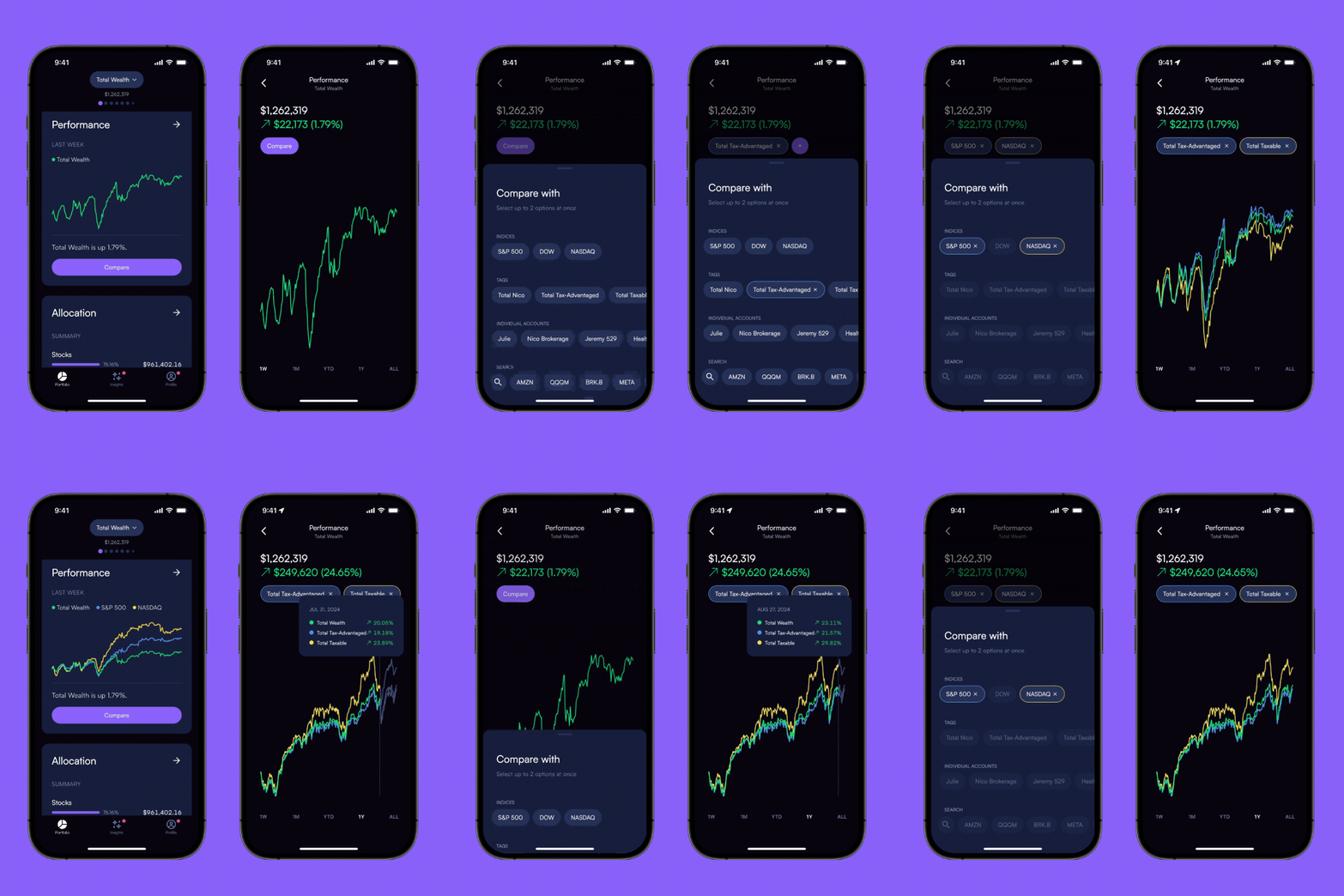
1. Set and save custom comparisons
Choose and save the comparison that fits each account's strategy. My Nasdaq and S&P 500 examples above illustrate different choices; they are not defaults for every brokerage or retirement account.
2. Compare tagged accounts
Because you've already tagged your accounts as Taxable or Tax-Advantaged (retirement, 529s, etc.) and by Owner (partner, child, etc.), you can now save your preferred comparison for each of these tags.
3. Compare with individual stocks
Compare your portfolio with an individual stock or ETF over the same period. A side-by-side return comparison is different from calculating how much that holding contributed to your portfolio's return.

4. Improved UI and data
We've also made enhancements to the interface to make it easier to select comparisons. We had a data issue last week, causing some of the performance charts to show as flat. This is now resolved.
Save a comparison that answers your question
My account examples above explain how I used the feature; they are not a recommendation to benchmark every Roth IRA against Nasdaq or every traditional IRA against the S&P 500. Tax status alone does not determine an appropriate investment benchmark. The holdings, strategy and risk matter.
Before saving a comparison, check three things: the same time interval, the treatment of dividends, and whether the portfolio return accounts for deposits and withdrawals. Also note whether the comparison is with an index, an investable ETF, a stock or another account; fees and composition can differ.
A useful follow-up to a performance gap
If an account returned 6% while its comparison returned 8% over the same period, the difference is two percentage points. Ask which asset classes, cash balances or holdings help explain it. Do not assume the entire difference is a fee or that a different benchmark would improve the actual result. Saved comparisons make a recurring review easier; they do not establish what caused a gap on their own.
Explore the current experience in your own account, or check the Mezzi help center for current setup and availability.
Open MezziBy Manish Jain, CFA, co-founder of Mezzi. Original publication date retained; editorial clarification September 26, 2026.
This historical product update is for informational purposes. Examples are illustrative, not investment recommendations or promised results. Account coverage and data quality affect analysis. Review assumptions before acting; AI can make mistakes.