
Updated September 26, 2026.
Archived article dated August 29, 2025. This dated product update has been edited for clarity. Launch details and roadmap statements below refer to the original publication date; screenshots are historical illustrations. See current membership options and the Mezzi help center for today’s product details.
You asked, we built it.
Starting today, you can manually add brokerage, bank, and crypto accounts to Mezzi — to include accounts that were missing from your investment view, even if your provider isn’t supported.
Two ways
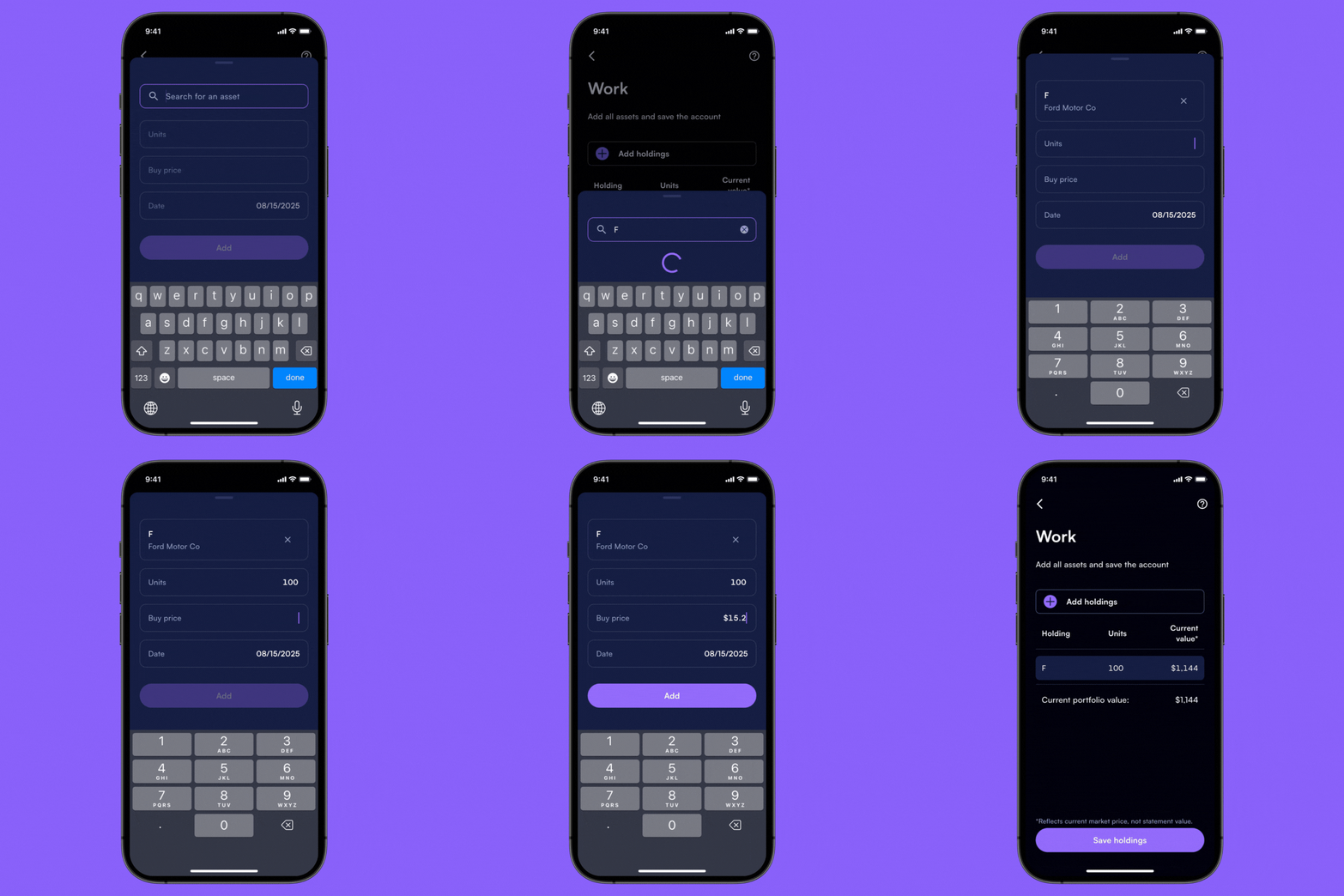
1. Enter it yourself
Type in your positions and balances directly, then check them against your source record.
2. Scan a document
Let Mezzi’s AI scan your PDF or CSV and fill in the details for you. Review the extracted fields against your source document.
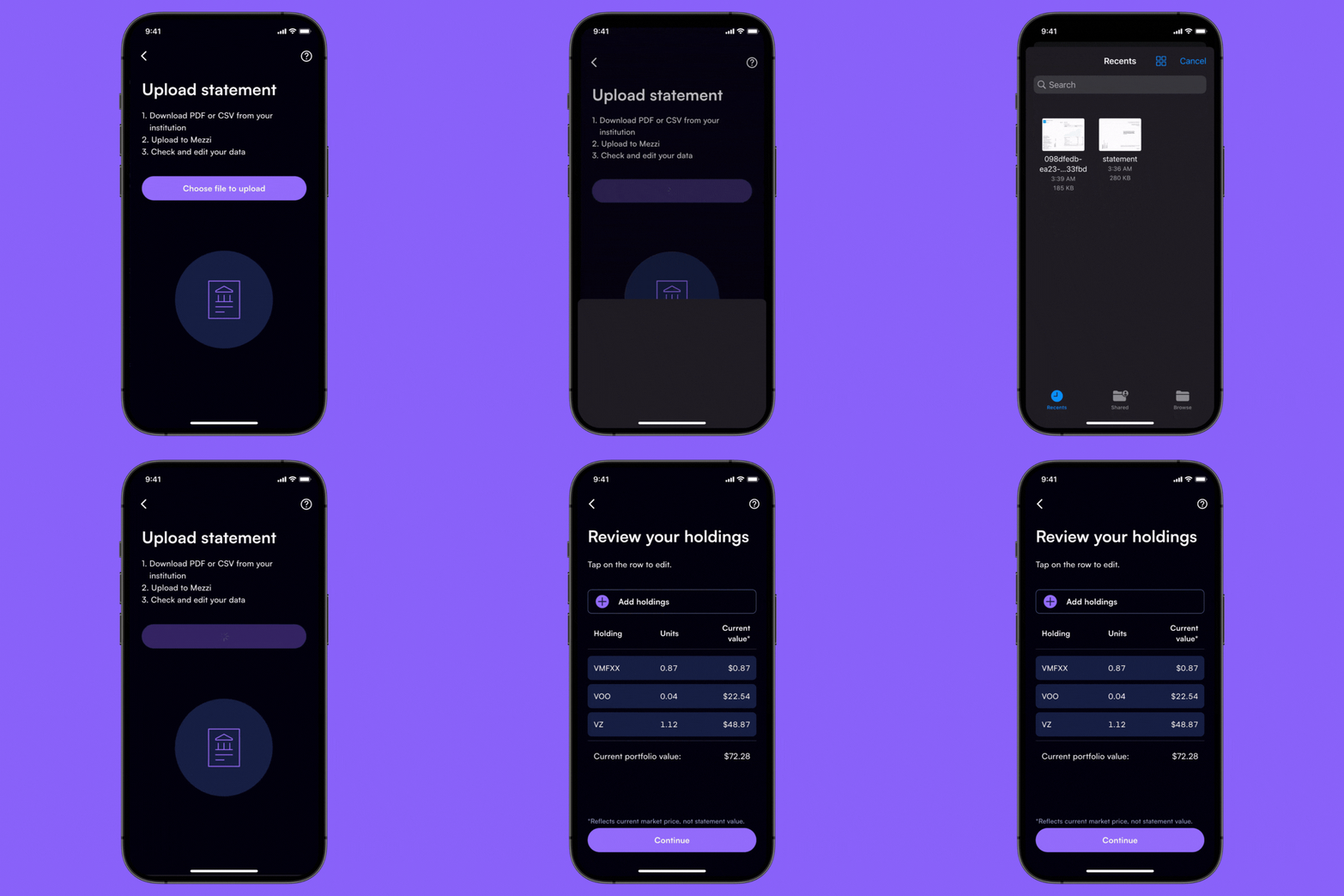
This can get complex. We worked to make this experience as simple as possible. Let us know what you think.
Why it matters
A more complete, accurate financial picture gives the discussion more relevant context. Adding missing accounts can reveal information that connected institutions did not supply.
Manual entry helps you fill coverage gaps while keeping the source and valuation date visible. It does not by itself establish that every relevant record is complete.
Getting started with manual entry
To manually add your accounts, go to the Profile page of Mezzi's mobile or web application and click "Add or edit accounts."

Roadmap announced in August 2025
Additional crypto tracking, including wallets and addresses
Support for more asset and liability types like real estate, vehicles, and loans.
Enhanced AI, including GPT-5 and other models
Increased personalization
Other recent improvements
Faster brokerage connections
Web app enhancements
Improved customer support
Check an imported account before using its insights
Use the statement date as the reference point. Check the account name, owner, cash balance, securities, quantities and values against the document. If cost basis or acquisition dates are missing, leave that uncertainty visible rather than assuming zero basis or guessing the tax status.
For example, a statement showing $18,000 of securities and $2,000 of cash should reconcile to $20,000. If a scan interprets that cash as another security and also adds it to cash, the apparent $22,000 total is wrong. Review the fields before treating the import as complete.
Will a manual account stay current automatically?
Manual entry fills a coverage gap; it is not evidence of an ongoing institution connection. Keep the valuation date visible and refresh information when balances change. If you later connect the same account, reconcile and remove or hide the duplicate representation. A stale manual balance can distort net worth, allocation and cash decisions even when the rest of the portfolio is connected.
Explore the current experience in your own account, or check the Mezzi help center for current setup and availability.
Open MezziBy Manish Jain, CFA, co-founder of Mezzi. Original publication date retained; editorial clarification September 26, 2026.
This historical product update is for informational purposes. Examples are illustrative, not investment recommendations or promised results. Account coverage and data quality affect analysis. Review assumptions before acting; AI can make mistakes.