Updated September 26, 2026.
Archived article dated June 26, 2026. This dated product update has been edited for clarity. Launch details and roadmap statements below refer to the original publication date; screenshots are historical illustrations. See current membership options and the Mezzi help center for today’s product details.
Here's an update for the Claude and ChatGPT power users.
If you already use AI assistants with your calendar, inbox and documents, this release adds a way to bring Mezzi financial context into those conversations.
Now, you can connect Mezzi to both via MCP (Model Context Protocol) and enrich your conversations with your financial context.
Ideas to get started
- Tax-preparation questions: Summarize available dividend records for review with your CPA.
- Models: Build an interactive Monte Carlo simulation.
- Market context: Ask your AI to cross-reference investment research from your inbox.
Claude setup described at launch
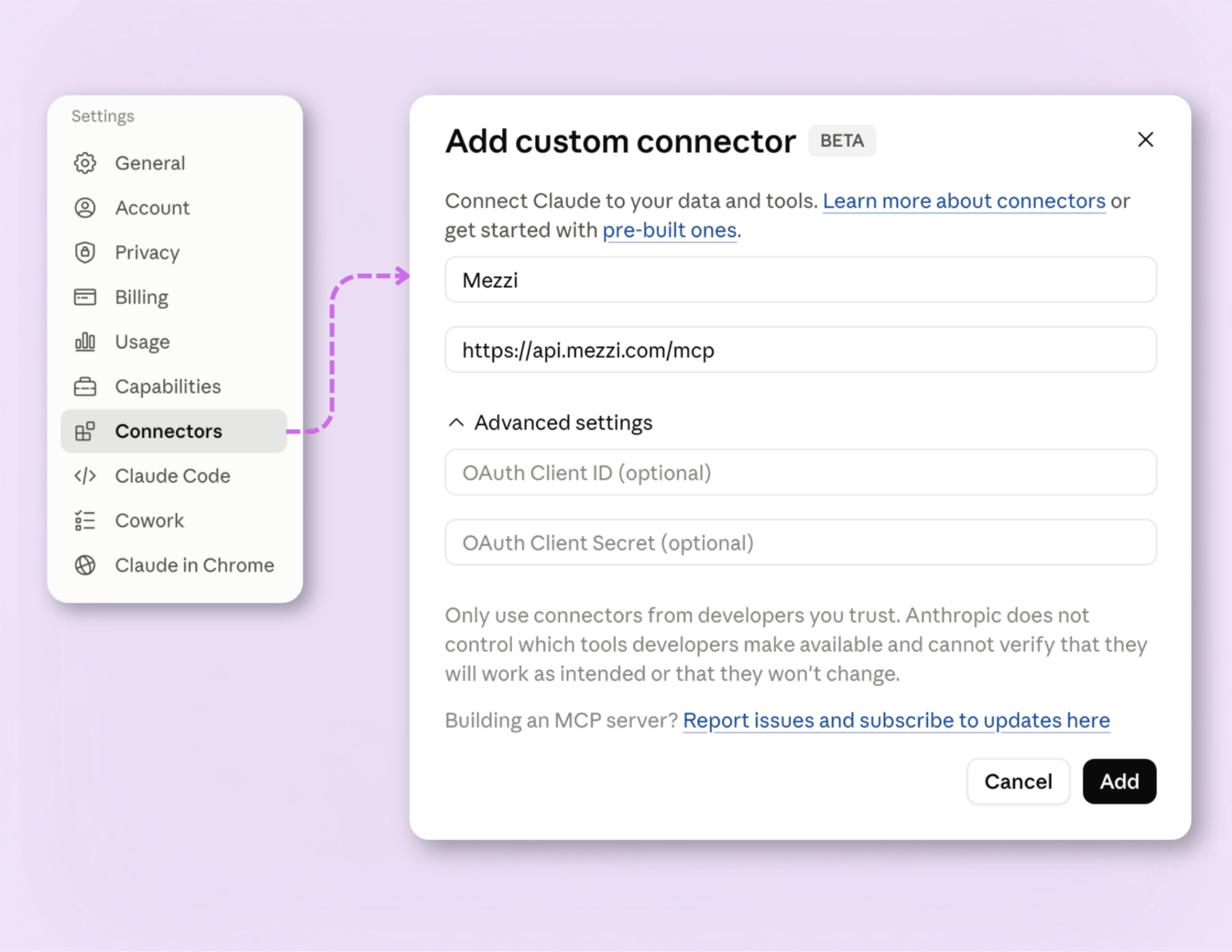
- Go to Settings → Connectors, or visit claude.ai/customize/connectors.
- Click the "+" and choose Add custom connector.
- Name it "Mezzi" and paste: https://api.mezzi.com/mcp
- Click Add, then Connect, and sign in to Mezzi when prompted.
- In any chat, click the "+", choose Add connectors, and toggle Mezzi on.
ChatGPT setup described at launch
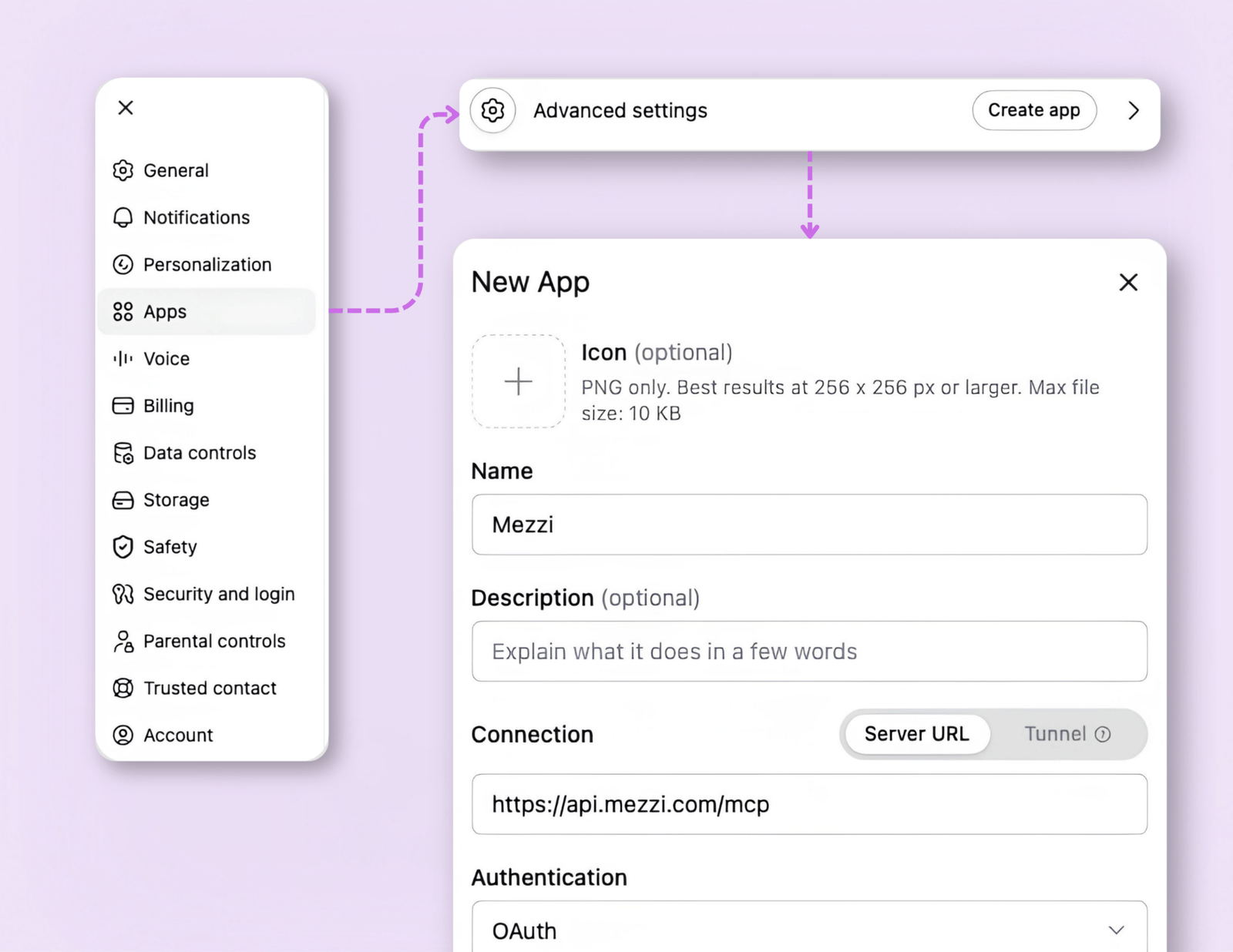
- In Settings → Apps & connectors → Advanced settings, turn on Developer mode.
- Back in Apps & connectors, click Create, name it “Mezzi” and paste: https://api.mezzi.com/mcp
- Complete the sign-in to Mezzi.
- In a new chat, open the "+" menu and then select Mezzi.
Connection check: Look for the host app’s indication that it called the Mezzi connector, then inspect the returned account scope and dates. Host plan requirements, menu labels and connector availability can change; the setup steps above are historical.
Review what information the connection will expose and the permissions you grant before enabling it.
The Mezzi application and external conversations
External AI services have their own capabilities, limitations and terms. Check their current documentation rather than treating this launch note as a feature comparison.
The Mezzi application on web and mobile is our primary focus. We focus product development and ongoing improvements there.
Mezzi's advice is provided in a fiduciary capacity within its advisory service. Connecting data to a separate AI application does not make every output of that application advice from Mezzi.
Confirm the connection before trusting a portfolio answer
Start with a narrow request: “Use the Mezzi connector to list the accounts available for this question and their data dates. Do not infer missing balances.” Compare the returned scope with your Mezzi account. A visible tool call confirms that a request was made; it does not prove every account was returned or every balance is fresh.
For a dividend summary, specify the calendar year and included accounts, distinguish paid income from an estimate, and reconcile with brokerage tax records before sharing it with a tax professional. For a simulation, require explicit assumptions and inspect the calculations; a chart generated by a chatbot is not a guaranteed retirement outcome.
Keep the connector and the host app's responsibilities clear
Review the permissions in both services before connecting financial data. Each service's data policies apply to its part of the interaction. Consult Mezzi's privacy policy and the host's current connector documentation, including how to disconnect access.
This launch described a way to bring Mezzi context into another conversation. It does not establish that other AI services lack financial integrations today, or that every answer produced by an external model is Mezzi fiduciary advice. Use the Mezzi application and current service disclosures to understand the scope of Mezzi's advice.
Explore the current experience in your own account, or check the Mezzi help center for current setup and availability.
Open MezziBy Manish Jain, CFA, co-founder of Mezzi. Original publication date retained; editorial clarification September 26, 2026.
This historical product update is for informational purposes. Examples are illustrative, not investment recommendations or promised results. Account coverage and data quality affect analysis. Review assumptions before acting; AI can make mistakes.