
If Legacy Full View was your main money dashboard, the move to the new version may have broken more than one workflow. Based on the article, the main issues may include missing outside accounts, stale balances, weaker spending data, and planning views that may look complete while leaving out part of your household picture.
Here’s the short version:
- Outside accounts may need to be linked again after the move
- Some accounts may stay hidden by default in net worth, analysis, and performance views
- Spending categories may be less reliable, which may affect budgeting and retirement inputs
- About 18% of connections still use login-based syncing, which may mean more relink prompts and refresh failures
- Fidelity may still work fine as the main custody hub, especially if most assets are already there
- A second read-only tool like Mezzi may fill gaps when you want cross-account portfolio, tax, and retirement analysis
If I were trying to sort this out on August 9, 2026, I’d view it this way: Fidelity may still cover the core brokerage side, but the old all-in-one household view may no longer feel the same unless every outside account is relinked, re-selected, and checked by hand.
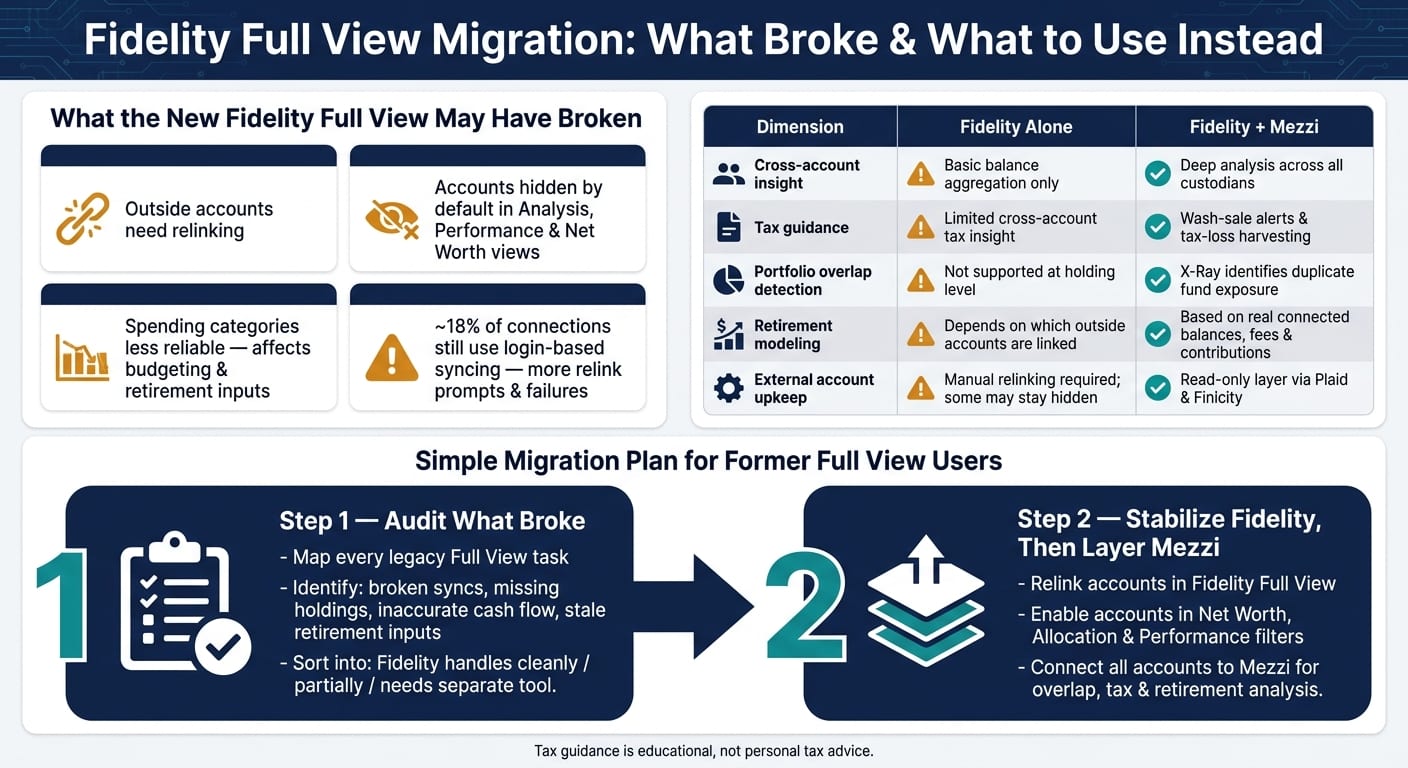
Quick Comparison
So this article comes down to one simple point: the old Full View may be gone, but the main jobs it handled may still be rebuilt with a mix of Fidelity setup fixes and a second analysis layer.
What broke after the move to the new Full View
External account links, refreshes, and credential issues
After the move, many relinked outside accounts stopped refreshing or disappeared until each institution was authorized again. Fidelity also says that if non-Fidelity accounts aren't relinked, Full View and any planning tools that rely on that data may show stale balances and less reliable results.
The upkeep also got heavier. Full View runs on eMoney Advisor, and about 18% of connections still use login-based syncing instead of direct APIs. When a bank or brokerage changes its site, those links may break. In day-to-day use, that may mean more login prompts, more multi-factor checks, and more friction every time an external account refreshes.
And when a connection breaks, the next problem tends to show up fast: pieces of your financial picture may stop showing up in analysis and performance views.
Holdings missing from analysis, performance, and net-worth views
Even after relinking, many investors said their accounts still didn't show up on their own in Analysis, Performance, or net-worth views. In the new setup, external accounts are hidden by default in Analysis, Performance, and net worth. Users have to turn them on in Account display preferences, and then often pick them again inside each tool.
So the dashboard may look complete at first glance, while still leaving out major accounts.
When aggregation is incomplete, rebalancing and withdrawal decisions may be distorted.
Cash-flow categorization and retirement planning inputs became less reliable
Legacy Full View also tracked spending and categories that many DIY investors used to monitor cash flow. The new version simplified categories, and that appears to have made spending data less reliable.
That change may ripple into retirement planning. Fidelity's planning tools may pull account values and spending history from Full View, but if transaction data is incomplete or categories are inconsistent, those gaps may feed weaker assumptions into retirement projections. If a large external liability drops off after relinking - like a HELOC or a student loan - net worth may look better than it actually appears in a fuller view. And for investors using Fidelity's tools to model Roth conversions or safe withdrawal rates, those missing pieces may skew the math downstream.
That leaves Fidelity's tools usable, but often only after the data is repaired by hand.
How far Fidelity's current tools can get you
Reconfigure the new Full View so outside accounts show up correctly
Open Full View under Accounts & Trade and review each linked institution for warning, relink, or credentials-required alerts. Then relink the connection, sign in again, complete MFA, and confirm which accounts are feeding the view.
After that, open the filters inside Net Worth, Allocation, and Performance and make sure every account that should count is selected. If you add a large account and the totals don’t change, that account may not be included correctly.
If an institution won’t stay connected, you may add it manually. You give up auto-updates and transaction detail, but the balance may still count in net worth and planning views.
Once the account list is cleaned up, the next issue is how far Fidelity’s planning tools may go on their own.
Use Fidelity planning tools with a clear sense of their limits
Once the data is cleaned up, Fidelity’s Planning & Guidance Center may still be useful. The Retirement Analysis tool runs 250 historical-return simulations to estimate retirement readiness. For a simple household, it may give a solid read on whether savings and contributions appear to be on track.
The limits may show up fast when things get more complex. It does not model tax buckets, withdrawal sequencing, or overlap across accounts. For Roth conversions, RMD coordination, or tax-loss harvesting across several accounts, many users may still end up back in a spreadsheet.
That trade-off stands out when you compare day-to-day ease with deeper analysis. If you need cross-account tax or withdrawal analysis, this is often where Fidelity may stop being enough.
Pros and cons of using Fidelity alone as your main hub
Fidelity’s tools are free, integrated, and useful for most day-to-day visibility needs.
If key accounts are missing or unreliable, Fidelity may have reached its limit.
What to use when you need a full household view again
Use Mezzi to rebuild a read-only view across Fidelity and non-Fidelity accounts
When Fidelity still leaves gaps, Mezzi may restore a household view as a read-only layer. It connects through Plaid and Finicity and pulls balances and holdings from brokerage, retirement, HSA, and cash accounts - without moving assets or adding a new custodian.
Once every account is visible, Mezzi may do more than show balances. That single view may let Mezzi spot overlap, wash-sale risk across accounts, and tax-inefficient holdings placement across accounts - something a tool that sees only one institution at a time may not handle the same way.
Add portfolio, tax, and retirement analysis that legacy Full View never handled well
The missing portfolio visibility from the prior section is where Mezzi's X-Ray tool comes in. It identifies overlapping stock exposure across ETFs and mutual funds held at different custodians. For example, similar index funds in taxable and retirement accounts may create hidden overlap.
For the broken planning and tax workflows, Mezzi flags year-round tax-loss harvesting opportunities, wash-sale risk across accounts, and tax-inefficient holdings placement. It also models retirement using your actual balances, contributions, fees, and allocation.
Tax guidance is educational, not personal tax advice.
Mezzi provides the analysis; you make the trades or transfers where your accounts already live.
Fidelity alone vs. Fidelity plus Mezzi: a side-by-side look
That setup may restore visibility now; the final section shows the simplest migration path.
Conclusion: a simple migration plan for former Full View power users
Step 1: Audit the reports and workflows that stopped working
If Fidelity still leaves gaps, start with a clean inventory of what broke.
Before changing anything, write down every task you used legacy Full View for. Then sort each one into three buckets: what Fidelity still handles cleanly, what Fidelity handles only partially, and what now may require a separate tool.
Focus the audit on four problem areas: broken syncs, missing holdings, inaccurate cash flow, and stale retirement inputs. Fidelity also removed bill management, rewards points tracking, and the calendar-based balances and expenses view in the new Full View.
List each affected account, institution, and failure mode. That may make it easier to fix the right connection or rebuild the right workflow, instead of guessing.
Step 2: Stabilize Fidelity first, then layer Mezzi for full-picture advice
Once the gaps are mapped, fix Fidelity's data feeds before adding a second layer.
Start with Fidelity: relink accounts, remove duplicate connections, and check whether aggregation settings may be hiding accounts.
Then connect all accounts to Mezzi for overlap, tax, and retirement analysis.
With both layers in place, the household view may feel much closer to restored.
Key takeaways
Losing legacy Full View may disrupt the workflows that keep a household financial picture accurate. One practical setup for some households may be a two-layer approach: Fidelity as the custody and core brokerage hub, and Mezzi as the read-only analysis layer for cross-account insight such as overlap, tax exposure, and retirement readiness. That setup may cover gaps a single-institution tool may not handle on its own with the same consistency.
FAQs
Why are some of my outside accounts missing?
Outside accounts may seem to disappear or stop syncing for a few common reasons: updated security requirements, changed login details, limits on third-party access, or temporary server issues.
To restore access, you may try:
- Re-authenticating the account
- Verifying your login credentials
- Unlinking and re-linking the account to refresh the connection
How can I tell if Fidelity's planning data is incomplete?
Compare your dashboard with your most recent account statements, ideally from the past 90 days. Look for any differences in balances, share counts, and cost basis.
A few small timing gaps may happen. But if you notice missing transactions, incorrect balances, or a sudden unexplained change in net worth, it may be worth taking a closer look.
If something seems off, some people investigate the account, reconnect it, or contact support for review.
When should I add Mezzi to my Fidelity setup?
Add Mezzi after you safely disconnect your external accounts from Fidelity Full View, verify your financial data, and export backups of your holdings, transaction history, and tax records as CSV or PDF files.
Then sign in to Mezzi, open Add Accounts, and securely link your Fidelity brokerage, IRA, and 401(k) accounts using Plaid or Finicity.
Disclosures:
- This content is for informational purposes only and does not constitute investment advice or a recommendation to buy or sell any security.
- Past performance is not indicative of future results. No guarantee of future performance or outcomes is implied.
- Savings and performance examples are hypothetical and for illustrative purposes only. Actual results will vary based on individual circumstances, portfolio composition, market conditions, and fees.
Related Blog Posts
- How to Find and Fix Portfolio Overlap Across Accounts
- The Morningstar X-Ray Alternative That Reads Every Stock, Not Just the Top Ten
- How to Leave Fidelity Full View and Take Your Data With You
- Mezzi vs Fidelity Full View: is the native tool enough
Outside accounts may seem to disappear or stop syncing for a few common reasons: updated security requirements, changed login details, limits on third-party access, or temporary server issues.
To restore access, you may try:
- Re-authenticating the account
- Verifying your login credentials
- Unlinking and re-linking the account to refresh the connection
Compare your dashboard with your most recent account statements, ideally from the past 90 days. Look for any differences in balances, share counts, and cost basis.
A few small timing gaps may happen. But if you notice missing transactions, incorrect balances, or a sudden unexplained change in net worth, it may be worth taking a closer look.
If something seems off, some people investigate the account, reconnect it, or contact support for review.
Add Mezzi after you safely disconnect your external accounts from Fidelity Full View, verify your financial data, and export backups of your holdings, transaction history, and tax records as CSV or PDF files.
Then sign in to Mezzi, open Add Accounts, and securely link your Fidelity brokerage, IRA, and 401(k) accounts using Plaid or Finicity.