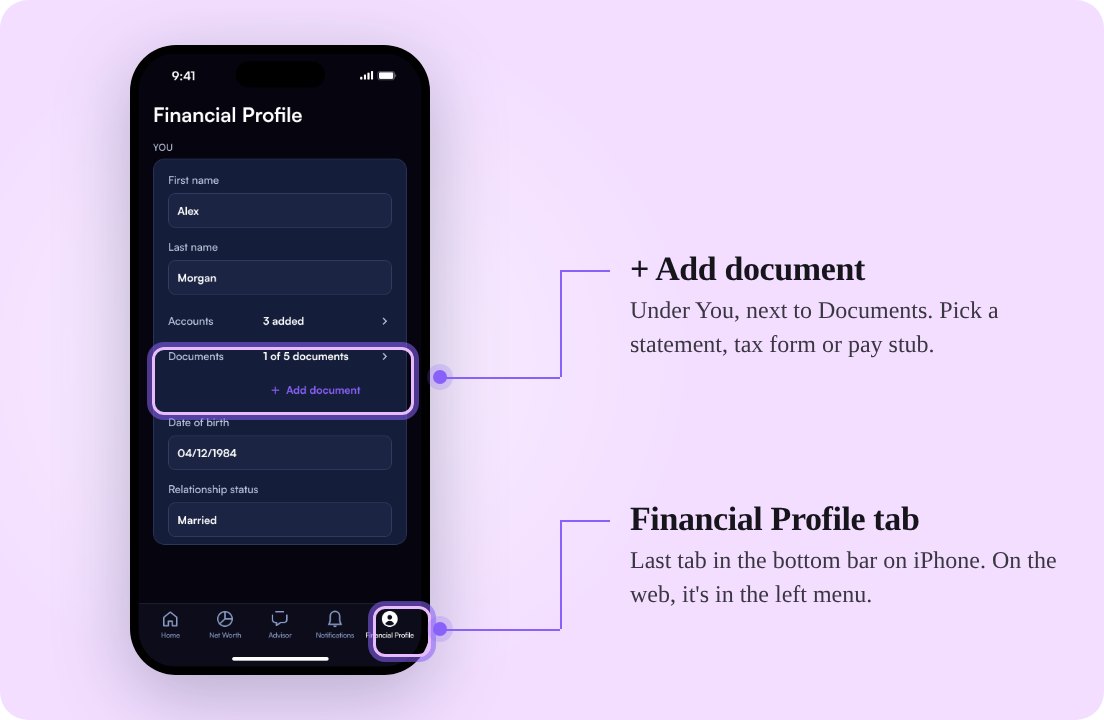
Your financial plans, statements and tax forms can now inform every conversation with your Mezzi advisor. Add them to Documents in your Financial Profile, and you won’t need to upload them again for each chat.
Bring a financial plan from your planner, K-1 tax forms from private investments, or an investor letter you want to understand. Ask about the details and what they mean for your finances.
Add your first document
Go to Financial Profile → You → + Add document. On iPhone, Financial Profile is in the bottom bar. On the web, it’s in the left menu.
In about two minutes, Mezzi extracts a summary, key figures and supporting details. Files or screenshots you attach in chat are added to Documents too.
Free and Advisory members can keep up to five documents. Concierge has no limit.
Give your advisor more context. Start with a statement, financial plan or tax form you want to discuss.
Add a documentSee how to add and manage documents for more help.
More context for your advisor
Once marked Ready, documents can inform any chat. Your advisor combines their details and flags conflicts with your Financial Profile.
Statements for untracked accounts can inform advice, but they don’t add to your net worth. This release keeps the information available for conversations; creating an account from an added document was announced as a planned follow-up.
This builds on September’s document upload feature, which introduced attaching files to a conversation.
What Mezzi keeps
Mezzi deletes the original file after reading it and retains the extracted details. If a file can’t be read, nothing from it is kept.
- Your Social Security number is never kept.
- For account numbers, only the last four digits are kept.
- You can review the retained details or delete a document at any time.
Read more about how Mezzi handles Social Security numbers. If something doesn’t appear in Documents, see why Mezzi didn’t keep a document.
Try asking
After adding your documents, open one of these questions in Mezzi:
- What does my latest statement show?
- Using my pay stubs and my tax return, am I on track with my tax withholding this year?
A few more improvements
- More complete answers. Holdings lists and tables extend beyond five rows. Leave a chat mid-answer and return to the complete response.
- Clearer portfolio analysis. Sector concentration and risk alignment better reflect the investments inside your funds.
- Clearer tax and account data. Wash-sale counts focus on the current tax year, and return answers flag missing historical data. This release also fixes missing transactions and balance discrepancies; some older transactions may need a refresh.
Add a document once, review what Mezzi retains, and bring that context into your next conversation. Need help? Contact Mezzi support.
This product update is for informational purposes only and is not personalized investment, tax or legal advice. AI responses can be incomplete or incorrect. Verify figures and assumptions against your records and consult a qualified professional before making financial or tax decisions. Features and availability can change.